


hackfidh
Members
-
Joined
-
Last visited
Everything posted by hackfidh
-
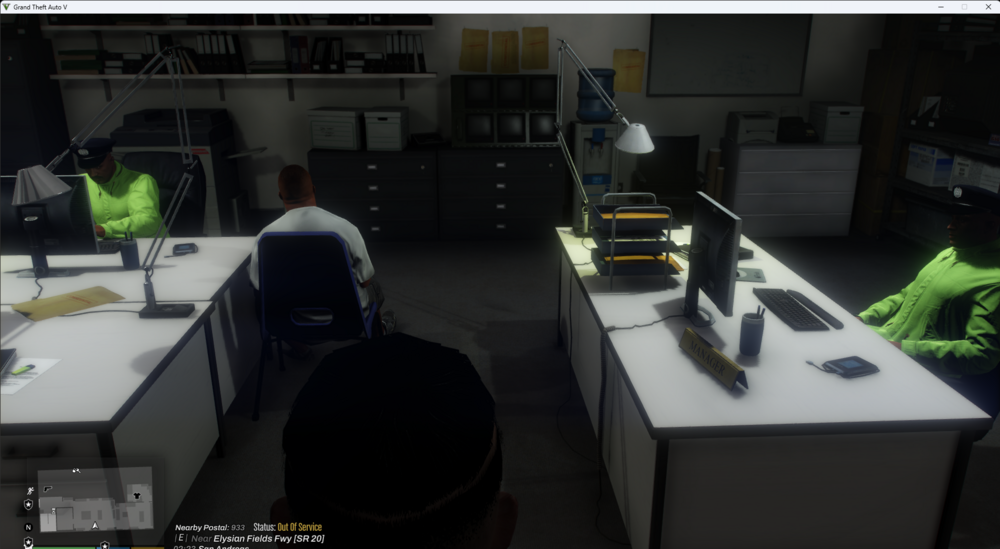
Hey guys, I’m having an issue with my police ped outfit in police station. When the weather is set to rain or thunder, I expected the ped to automatically switch to the raincoat variant (like the typical raincoat police wear). However, instead of showing the correct raincoat outfit, the ped is just wearing a bright green jacket, which doesn’t look like the proper raincoat. Any idea how to fix this or force the correct raincoat outfit to show during rainy/thunder weather conditions? Is there something wrong with the ped configuration or eup skins need to be replaced? Appreciate the help! (this screenshot from PD Station of LSPDFR Expanded)
-
.thumb.png.b9e18d9931090871b064059f2c315cf8.png) Hey guys, I’m having an issue with my police ped outfit inside the police station. When the weather is set to rain or thunder, I expected the ped to automatically switch to the raincoat variant (like the typical raincoat police wear). However, instead of showing the correct raincoat outfit, the ped is just wearing a bright green jacket, which doesn’t look like the proper raincoat. Any idea how to fix this or force the correct raincoat outfit to show during rainy/thunder weather conditions? Is there something wrong with the ped configuration or eup skins? Appreciate the help! anyway, this mod works fine and i love it sm!
Hey guys, I’m having an issue with my police ped outfit inside the police station. When the weather is set to rain or thunder, I expected the ped to automatically switch to the raincoat variant (like the typical raincoat police wear). However, instead of showing the correct raincoat outfit, the ped is just wearing a bright green jacket, which doesn’t look like the proper raincoat. Any idea how to fix this or force the correct raincoat outfit to show during rainy/thunder weather conditions? Is there something wrong with the ped configuration or eup skins? Appreciate the help! anyway, this mod works fine and i love it sm!- 706 comments
- 24 reviews

.thumb.png.b9e18d9931090871b064059f2c315cf8.png)