KingmartinV5
Members
-
Joined
-
Last visited
Everything posted by KingmartinV5
-
 Hey @jedahdiah I am an .OIV developer and would like to include your packs in my oiv I will add credits that you made this and everything and will give links to your profiles If not, It's fine but It would be awesome if you would allow this I have a big community and always credit the person behind the work, I just package your work and promote it + package it with other plugins Like ELS so people can open one .OIV file with OpenIV and everything is installed Thanks, Martin
 -
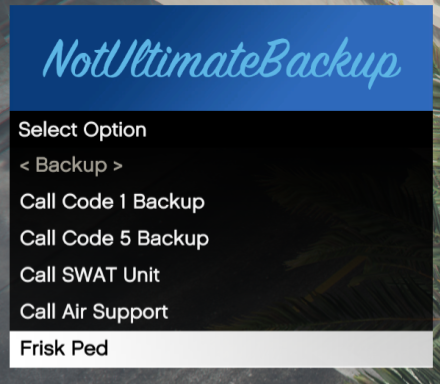 Hey there! Seeing NotUltimateBackup got 1,781 Downloads, I am now again working on it And all the updates are gonna be major and MASSIVE I am very happy to refurbish NotUltimateBackup as that many downloads I've never ever seen in my life! Thank you LCPDFRs!!! ❤️❤️
 -
1. No but we will update, we are working on a major update right now 2. Yes
-
So when i like load the game through RPH its all fine now when i get to the part "Loading LCPDFR" Then EUP Menu Crashes, Its not on duty, nor anything I installed law and order and everything i need through open iv and in the logs it just says Loading EUP then Plugin crashed And i watched like a million of tutorials non of them helps, this is my last hope
-
Oh Yes, Im working on the heli support and ill do the automatic ultimate backup cause personally me too im always busy talking to grammar police and cant request backup. Thanks for the comment :)
-
Oh hello, Well Sometimes in UB when you had a felony or normal traffic stop and would have wanted backup sometimes (45.9% chance exactly) they would come more units then you wanted Then sometimes air support would have come the wrong direction even if the suspect would have been on sight. And i will add more features but it is diffrent
-
Oh my Im stupid I will fix it right away, Thank you for pointing out the issue
-
Oh and do i need to do something for it to be available Or DO i need to change it
-
Sorry it will I just fixed one thing and the lspdfr is not needed please approve it i will really upload the good file But LOAD IT THROUGH THE CONSOLE
-
Sorry it will I just fixed one thing and the lspdfr is not needed please approve it i will really upload the good file
-
NotUltimateBackup is a Plugin For better Backup, More codes (Code 1, 6, 5) Adds More Swat Units, More Fun! Refereed and Motivated by Ultimate Backup Made By KingmartinV5 and KingsEmpire Studios © Please Load it in the console using LoadPlugin NotUltimateBackup.dll
-
Okay, Do you have RageNativeUI, ScripthookV, and ScriptHookVDotNet? If Not visit my Fix stop the ped post on my profile and download them there.
-
As you said 60,000 Thresholds I set it to 100,000 and then it worked for me but still there isnt really why it crashed in the logs. Do you have any Other Plugins? If Yes let me know
-
Hello, Fellow LCPDFRers. Have, you ever had problems with Stop the Ped plugin? (Download: Here) Now, If you had problems with the menu, Listen to me carefully and do these things: Download Script Hook V Dot Net (Download: Here) Download Script Hook V (Download: Here) Download Rage Native UI (Download: Here) -------------------------------------------------- Locate your LSPDFR Plugin File and add STP (Stop the Ped) To the Plugins Folder Don't Want to do that? Copy From here the folder and Boom you're Done (Download from this Post) And Paste Script Hook V + Dot Net + Rage Native UI to the GTA 5 Root Folder. If you don't See the Folder in this post. Click: Here
-
As, I see in the Log. As @PC Leo Said then yes, change the pluginTimeOutThreshold to 60000 As the 10000 Can cause Problems with StopThePed config files. Learn more: Here