Skip to content
View in the app

A better way to browse. Learn more.

LCPDFR.com

A full-screen app on your home screen with push notifications, badges and more.

To install this app on iOS and iPadOS
  1. Tap the Share icon in Safari
  2. Scroll the menu and tap Add to Home Screen.
  3. Tap Add in the top-right corner.
To install this app on Android
  1. Tap the 3-dot menu (⋮) in the top-right corner of the browser.
  2. Tap Add to Home screen or Install app.
  3. Confirm by tapping Install.

Slawman722

Members
  • Joined

  • Last visited

Everything posted by Slawman722

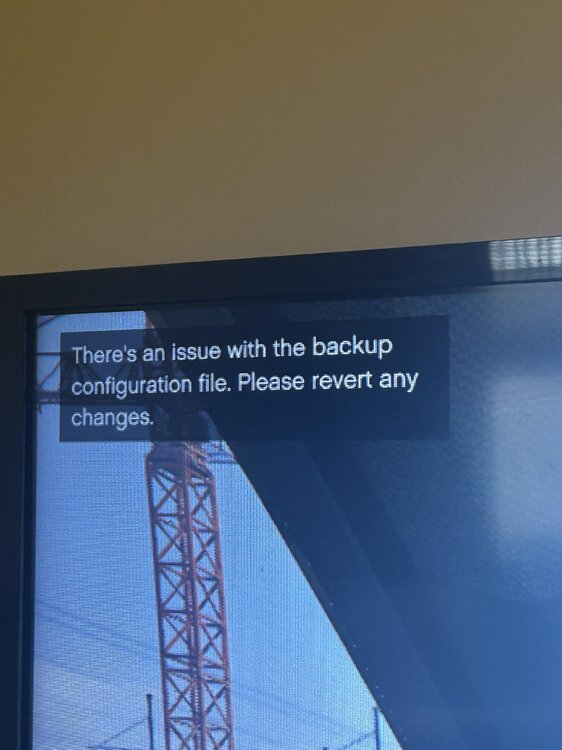
  1. Anytime I request backup it says that there is an issue with the backup configuration file
  2. Well you can’t see this picture but grammar police says backup isn’t working and tells me to check config file
  3. ya here you go RagePluginHook.log
  4. Every time I log into the game it crashes and says it’s because of a bad xml file I have looked at my xmls numerous times and nothing is fixing it . If anybody knows anything lmk please

Account

Navigation

Search

Search

Configure browser push notifications

Chrome (Android)
  1. Tap the lock icon next to the address bar.
  2. Tap Permissions → Notifications.
  3. Adjust your preference.
Chrome (Desktop)
  1. Click the padlock icon in the address bar.
  2. Select Site settings.
  3. Find Notifications and adjust your preference.