Skip to content
View in the app

A better way to browse. Learn more.

LCPDFR.com

A full-screen app on your home screen with push notifications, badges and more.

To install this app on iOS and iPadOS
  1. Tap the Share icon in Safari
  2. Scroll the menu and tap Add to Home Screen.
  3. Tap Add in the top-right corner.
To install this app on Android
  1. Tap the 3-dot menu (⋮) in the top-right corner of the browser.
  2. Tap Add to Home screen or Install app.
  3. Confirm by tapping Install.

Glocki

Members
  • Joined

  • Last visited

Everything posted by Glocki

  1. Many thanks for advice for now is working
  2. Hi, I have instelled a few mods like stop peds, ELS, 686 and MCC callouts, Ultimate Backups and Compu Lite game is nomraly loading but a somtime I have a lspdfr.dl crash or i must wait along time for any callout. I have current AdvanceHook V.dll and RAGENative.dll RagePluginHook.log
  3. Hi after add ddl mod works thanks for help
  4. after add DDL file I have this type ERROR
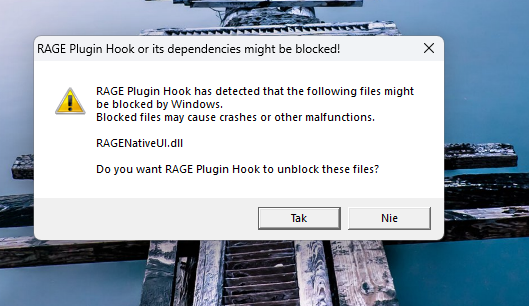
  5. Hi, I have a problem with LSPDFR after I launch mod or go to the police station LSPDFR crash on DDL RagePluginHook.logdown is my log. all mods was install with instruction
Account

Navigation

Search

Search

Configure browser push notifications

Chrome (Android)
  1. Tap the lock icon next to the address bar.
  2. Tap Permissions → Notifications.
  3. Adjust your preference.
Chrome (Desktop)
  1. Click the padlock icon in the address bar.
  2. Select Site settings.
  3. Find Notifications and adjust your preference.