Skip to content
View in the app

A better way to browse. Learn more.

LCPDFR.com

A full-screen app on your home screen with push notifications, badges and more.

To install this app on iOS and iPadOS
  1. Tap the Share icon in Safari
  2. Scroll the menu and tap Add to Home Screen.
  3. Tap Add in the top-right corner.
To install this app on Android
  1. Tap the 3-dot menu (⋮) in the top-right corner of the browser.
  2. Tap Add to Home screen or Install app.
  3. Confirm by tapping Install.

HeathenKing1

Members
  • Joined

  • Last visited

Everything posted by HeathenKing1

  1. Backup as in the Ultimate Backup config?
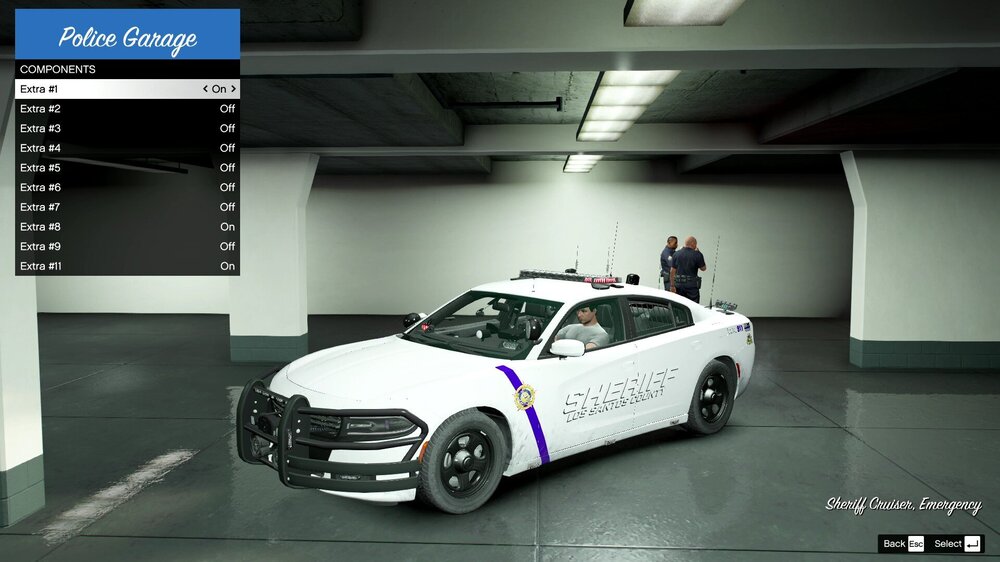
  2. I have installed the Los Santos Sheriff 1.0.1 pack by OfficerArk and I am having an issue that I cannot resolve. With this specific pack, the 18 Charger when put into the sheriff slot always spawns white instead of black, the way that the author created it. If I spawn the vehicle via TrainerV it spawns the correct color, but the AI vehicles won't. The author suggested changing the color via the trainer but that only changes the color of my own spawned vehicle, not the AI ones. The Durango from this pack spawns correctly, but the Charger wont. Screenshots included for visuals Any help would be greatly appreciated! Thanks!

Account

Navigation

Search

Search

Configure browser push notifications

Chrome (Android)
  1. Tap the lock icon next to the address bar.
  2. Tap Permissions → Notifications.
  3. Adjust your preference.
Chrome (Desktop)
  1. Click the padlock icon in the address bar.
  2. Select Site settings.
  3. Find Notifications and adjust your preference.