PublicAnemoneNumberOne
Members
-
Joined
-
Last visited
Everything posted by PublicAnemoneNumberOne
-
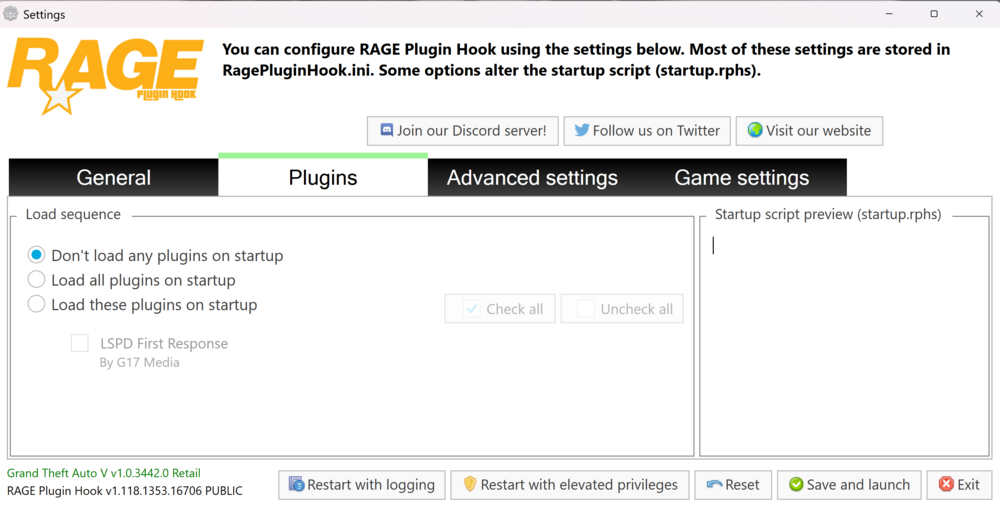
I’ve installed EUP 5 to 10 times now on a fresh copy of GTA with no mods except for LS PDF R and every time I try to load all my plug-ins the only plug and I happen to have is LSPDFR and I’m wondering why EUP isn’t working anything will help.
-
I’m relatively new to lspdfr and have been exploring the different plugins and mods, but recently I downloaded stop the ped, ultimate questions, and EUP uniforms. I installed stop the ped and other various add ons with the help of a YouTube video by BlueLine Vibes formally known as Benzo Effect on how to install stop the ped and after I spent 45 minutes to an hour installing it I tried launching lspdfr but was stuck on launching game, then I watched a tutorial on how to fix my issue. The tutorials said to run RagePlugin hook as administrator and I got past the launching games it would load when you either get dropped off at one of the stations or are in your apartment but then I hear the “LSPDFR has crashed” sound and my entire screen goes black and nothing on my pc works at all and I have to unplug my pc and plug it back in to get anything else to work. Any words of wisdom?