
Eplayzz
Members
-
Joined
-
Last visited
Everything posted by Eplayzz
-
As the screenshots are, it is installed correctly
-
If GTA runs, LSPDFR should also run on the PC
-
Did you change the EUP and SUP configurations too? If so try replacing this file, mby it worksDefaultRegions.xml
-
Hello, please send the log and the configuration file from Ultimate Backup (drag and drop) to the forum.
-
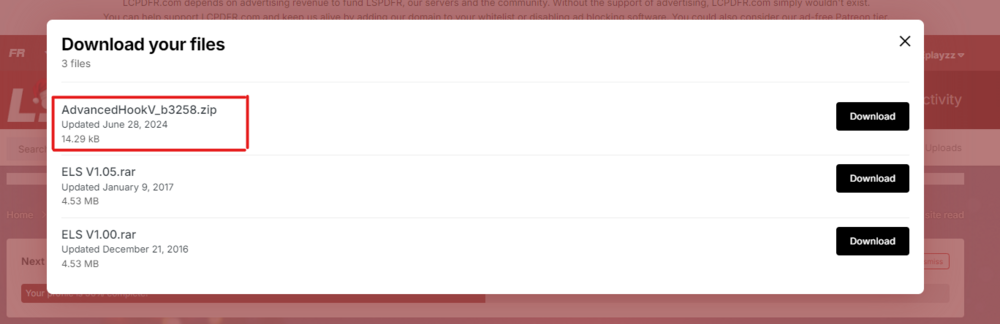
Make sure you have downloaded the new AdvancedHookV_b3258 (from ELS Downloadpage) and put it into the GTA main directory.
-
Somehow I can't open the crash report. After renaming the mod folder, the game config may no longer be sufficient. The F4 crash often comes from ScripthookV Dot Net. Please download the latest nightly version and try again. Releases · scripthookvdotnet/scripthookvdotnet-nightly
-
You need vehicles that support ELS. To use ELS you need ScripthookV and the new AdvancedHookV (form the LSPDFR -> ELS download page)
-
-
ClearTheWayV has a new update for compatibility with the new RPH version
-
Short tutorial for addon Cars: 1) Install OpenIV, open and activate Edit Mode 2) Drag the folder with the dlc.rpf into the following directory: mods -> update -> x64 -> dlcpack 3) Go to mods -> update -> update.rpf -> common -> data -> dlclist.xml 4) add a new line below (before the last </Paths>): <Item>dlcpacks:/NAMEOFMOD/</Item> Otherwise there are also a bunch of tutorials on YouTube: https://www.youtube.com/watch?v=OEt4Oky3KtU
-
Please generate a crash report and send it to the forum
-
Please send the crash report. If you are using ScripthookV Dot Net, make sure you are using the latest nightly version. https://github.com/scripthookvdotnet/scripthookvdotnet-nightly/releases
-
You need to download the AdvancedHookV_b3258.zip from the ELS download page. Then simply drag and drop the AdvancedHookV.dll into the Grand Theft Auto V main directory.
-
Hello, my game crashed after about 1RagePluginHook.log0 minutes. Before the last GTAV updates everything was working fine, I also updated a lot of things.