Skip to content
View in the app

A better way to browse. Learn more.

LCPDFR.com

A full-screen app on your home screen with push notifications, badges and more.

To install this app on iOS and iPadOS
  1. Tap the Share icon in Safari
  2. Scroll the menu and tap Add to Home Screen.
  3. Tap Add in the top-right corner.
To install this app on Android
  1. Tap the 3-dot menu (⋮) in the top-right corner of the browser.
  2. Tap Add to Home screen or Install app.
  3. Confirm by tapping Install.

specz19

Members
  • Joined

Everything posted by specz19

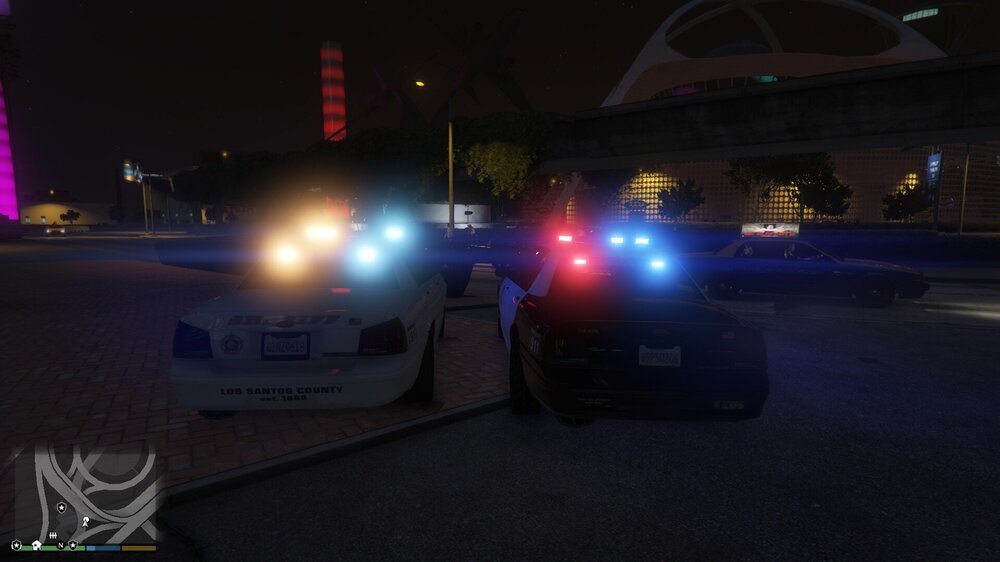
  1. After installing RadianceV, the lights on the crown vic style police cruisers went from red and blue to orange and cyan, I only use the vanilla vehicles and all other vehicles were unaffected. I looked through the forums and saw that it had happened to others before so I tried some of the fixes suggested there, all shaders and postFX set to max, altering the .ytd textures and the visualsettings.dat and eventually managed to fix the issue for the LSPD cruiser but I cant seem to fix the Sheriff cruiser. Any help would be appreciated.
Account

Navigation

Search

Search

Configure browser push notifications

Chrome (Android)
  1. Tap the lock icon next to the address bar.
  2. Tap Permissions → Notifications.
  3. Adjust your preference.
Chrome (Desktop)
  1. Click the padlock icon in the address bar.
  2. Select Site settings.
  3. Find Notifications and adjust your preference.