


Luke201226
Members
-
Joined
-
Last visited
Everything posted by Luke201226
-
worked thanks
-
I just installed a brand new game since my other one got broken. I have only installed stop the ped, ultimate backup and ALPR lite. I did install other things too like ResourceAdjuster, PackFileLimitAdjuster, HeapAdjuster, Gameconfig, SimpleTrainer, ScriptHookV dotnet, and ScriptHookV. These were all working though. asiloader.logGTAV.ResourceAdjuster.logScriptHookV.logHeapAdjuster.logRagePluginHook.logRagePluginHook_23062026_175947.log ScriptHookVDotNet.log
-
I dont believe that i did but I was thinking that too... I may just do that
-
Still crashing... I rename mods folder didn't have scripts and i ran rage plugin hook as admin. RagePluginHook_22062026_175938.logAdvancedHookV.logasiloader.logGTAV.ResourceAdjuster.logHeapAdjuster.logRagePluginHook.logScriptHookV.logScriptHookVDotNet.log
-
Alright, I was able to open the console 1 time then it crashed again. asiloader.logAdvancedHookV.logGTAV.ResourceAdjuster.logHeapAdjuster.logRagePluginHook.logScriptHookV.logScriptHookVDotNet.log AdvancedHookV.log
-
Yes
-
Still once getting into the game and trying to open the console it crashes immediately. All files listed again RagePluginHook_21062026_181652.logAdvancedHookV.logasiloader.logRagePluginHook.logScriptHookV.logScriptHookVDotNet.log
-
asiloader.logScriptHookVDotNet.logScriptHookV.log Here are all my logs I may just have to reinstall gta 5
-
My bad, earlier when i first uploaded this i would have but it didn't log it then for some reason. It just showed up now. its listed bellow! RagePluginHook_21062026_181103.log
-
The file is listed bellow I have heap adjuster, resource adjuster, etc, etc, I haven't touched them yet. Is it listed in here why this happened? It was a rage plugin hook crash. I tried opening the console in the game and it crashed. Pasted content
-
They might be just outdated... I might have to just get the new files from the original sources...
-
Alright I got LSPDFR working but some of my plugins arn't working how do I check the log for which ones are working or not becuase theres nothing in the rage plugin hook logs
-
Yea... I downloaded the latest lspdfr file and installed it but it was crashing not sure why but it still was crashing.
-
Yea, I just updated LSPDFR and RPH before I made this... Is there a newer one that I am unaware of? I downloaded the new RPH the other day when it was saying the game version was out of date with RPH but then I just got the newest version of LSPDFR and downloaded it but that I guess didn't do anything.
-
I checked the rage plugin hook for any signs of something going wrong but I found nothing. I haven't played LSPDFR in quite a bit of time so I do not know if anything is outdated or not. Any help is appreciated RagePluginHook_21022026_225310.log
-
RagePluginHook.log
-
What I’m trying to say is that the log file is not saved there. There was only 5 previous files but they were from previous days and I was not even loading in on those so there is nothing in there.
-
Yes there is but the crash report didnt save for what ever reason.
-
Alright, so the log did not save for some reason but it crashed after a bit of playing and also my grammar police is not loading in.
-
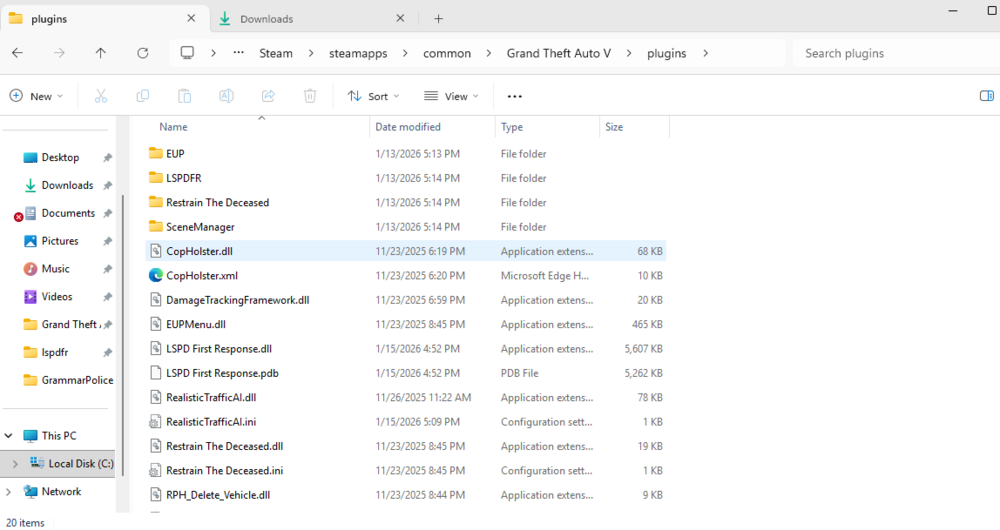
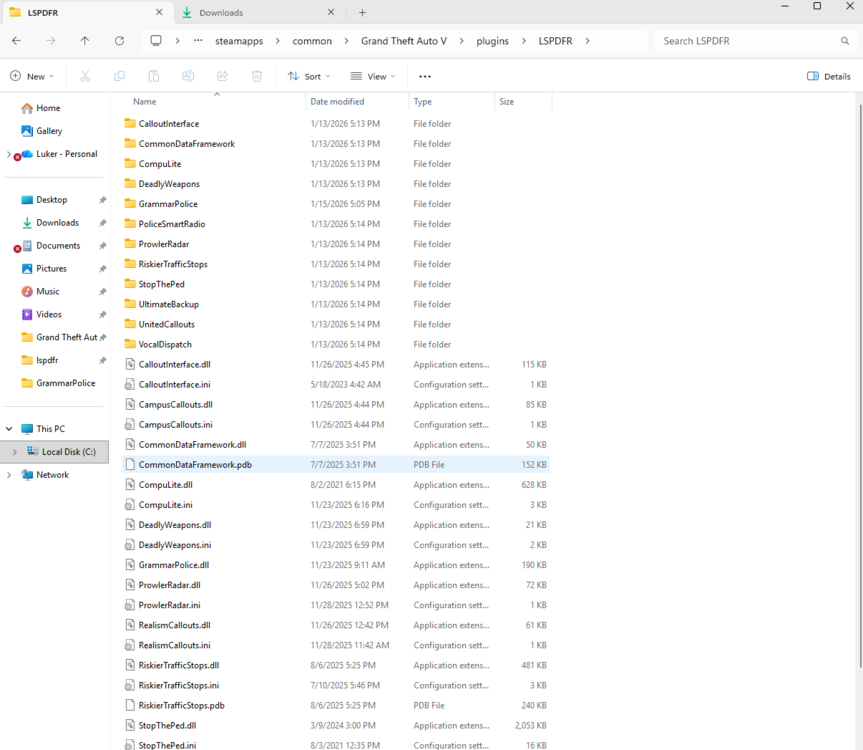
When I open the game and enter into it all of my plugins anent loading like grammar police, ultimate backup, stop the ped, etc etc. Any help would be appreciated. Also all of those type of plugins are held inside of the LSPDFR folder inside of the plugins folder. I also did just reinstall the game after taking all of these files out and putting them back in after reinstalling.
-
The rage pluging hook file below it explains it... It says theres a bug with the ai not knowing how to correctly respond to me going to them... Sometimes I can respond and others which is most times it just does this. RagePluginHook_26112025_172342.log

