
Jack Rossi
Members
-
Joined
-
Last visited
Everything posted by Jack Rossi
-
 Ciao ragazzi, se avete bisogno di ulteriore supporto non dimenticatevi di venire sul mio server discord dove abbiamo un auto log reader, e canali dedicati al supporto, dove potete oltretutto aprire un ticket per parlare in vocale direttamente con me dove cercherò di aiutarvi e risolvere i vostri problemi! ecco il link al server discord: https://discord.gg/qne2dZeACq
 -
Guida rapida e gratuita in italiano per installare LSPDFR su GTA V, con istruzioni passo passo, link utili e soluzioni ai problemi più comuni. Ideale per chi vuole iniziare a giocare con la mod in modo semplice e sicuro. A free, easy-to-follow Italian guide for installing LSPDFR on GTA V, including step-by-step instructions, useful links, and solutions to common issues. Perfect for anyone wanting to get started with the mod smoothly and safely. TOS 📜 Termini di Utilizzo – Guida Italiana LSPDFR Jack's Development Studios | UNOFFICIAL ITALIAN LSPDFR SUPPORT 📜 Terms of Use – Italian LSPDFR Guide Jack's Development Studios | UNOFFICIAL ITALIAN LSPDFR SUPPORT 1. Licenza e uso La guida viene fornita gratuitamente “così com’è”. Puoi consultarla, scaricarla e condividerla liberamente, a patto di non modificarla, alterarla o diffonderla senza attribuzione all’autore. 1. License and Use This guide is provided for free "as is." You are free to view, download, and share it, as long as you do not modify it, alter it, or redistribute it without crediting the author. 2. Proprietà intellettuale Tutti i diritti d’autore e proprietà intellettuale restano in capo all’autore. Qualsiasi distribuzione non autorizzata è vietata. 2. Intellectual Property All copyrights and intellectual property rights remain with the author. Unauthorized distribution is prohibited. 3. Link esterni e software di terze parti La guida può contenere link a software non creati dall’autore (es. LSPDFR, RAGEPluginHook). L’autore non ne garantisce l’aggiornamento. 3. External Links and Third-Party Software The guide may contain links to software not created by the author (e.g., LSPDFR, RAGEPluginHook). The author does not guarantee that these links or resources will remain up to date. 4. Supporto e feedback Il supporto è fornito attivamente tramite il server Discord ufficiale indicato nella guida. Per problemi tecnici, si consiglia di consultare anche i forum di LSPDFR o le sezioni FAQ. 4. Support and Feedback Support is actively provided via the official Discord server listed in the guide. For technical issues, it is also recommended to consult the LSPDFR forums or FAQ sections. 5. Modifiche ai termini L’autore può aggiornare i termini in qualsiasi momento. Le modifiche entrano in vigore al momento della pubblicazione. 5. Changes to Terms The author may update these terms at any time. Changes take effect once published.
-
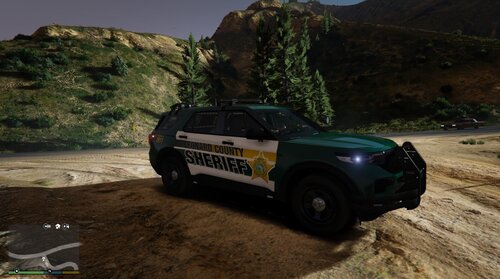 could u make this for a charger too? it would be perfect