

TaylorSwift.
Members
-
Joined
-
Last visited
Everything posted by TaylorSwift.
-
What I recommend you do first is go to your GTA V Directory, look for the GTA5 exe, then click delete, go to your launcher, for example Epic Games, Steam, then verify files. it should force an update. Epic: C:\Program Files\Epic Games\GTAV Steam: C:\Program Files (x86)\Steam\steamapps\common\Grand Theft Auto V I had the same error youre facing, let me know if it fixes anything, hopefully this should work for you ~ Taylor

-
-
Thank you rich, forsure. If anything comes upon let me know, I'm prepared to take any type of action as I do believe this isn't morally right
-
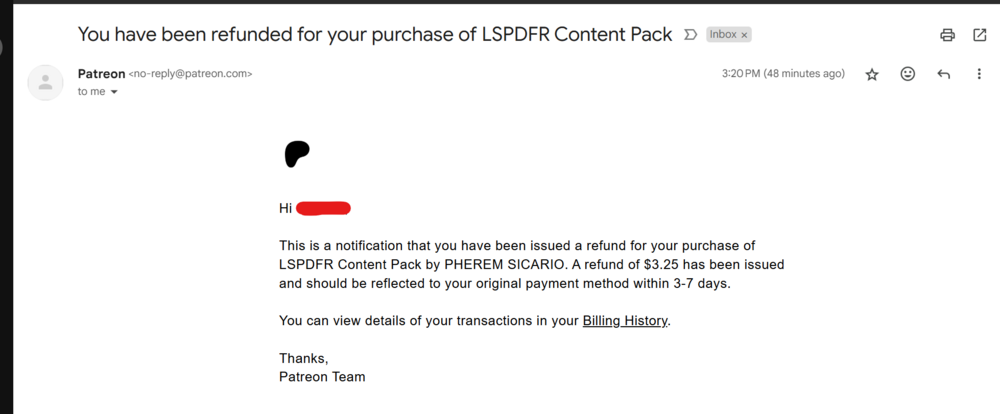
Hello everyone, I wanted to formally address that refunds have been issued after making a legal threat against Pherem, also known as "Pherem Sicario." These refunds pertain to the plugin that was found to be in violation of @Rich's licenses and plugins. Please check your email if you purchased the plugin to ensure you have received your refund. I became aware of this situation after reviewing BLV's Discord server and reflecting on the fact that it's unacceptable for developers' work to be exploited for profit. As a developer, I strongly believe that stolen content or works should not be tolerated. If you're involved in this kind of activity, please be aware that it is illegal and unethical. This serves as a warning—do not engage in these practices. Thank you. Screenshots: Original post: Screenshot of Refund


-
Hello @Rich, Really enjoy your plugins sorry this happened to you. it's a shame people like this exist and cannot respect that Open Sourced Licenses are there in place for a reason, where you cannot just go and sell things that aren't yours, I really hope you return sometime and recreate some amazing plugins, for now. they shall rest in the LSPDFR Community ❤️. Once again, thank you for being an amazing person and bringing the situation to light. ~ Taylor