mujali94
Members
-
Joined
-
Last visited
Everything posted by mujali94
-
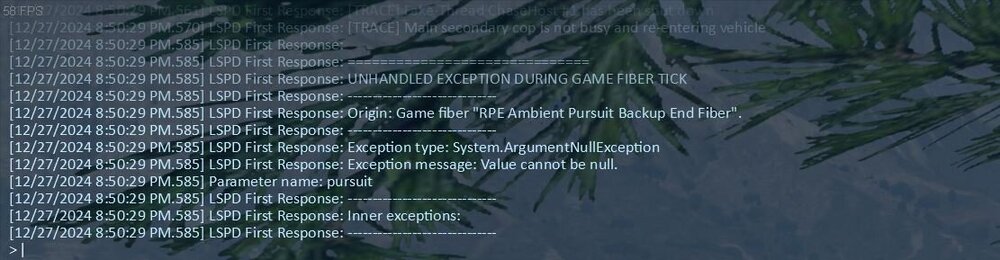
I was hoping to get some help with my game crashing. I tried to remove and go through the log but cannot figure out what is going on. When I go on duty i can play for a few minutes then the game crashes to windows or sometimes the lspdfr plugin crashes in game. Any assisRagePluginHook.logtance would be appreciated =)
-
I will try that. Thank you!
-
I did that. It seems to be running smooth without the mods.
-
Ok so I tried removing and readding the files and the game runs fine for a few mins then all of a sudden it crashes to the desktop and I get the RAge crash notification. Any idea what is going on? RagePluginHook.log
-
Wierd, I never touched the Tursimo3 model. Every vehicle I do mod I always backup the orignal files first but that is not in my list.
-
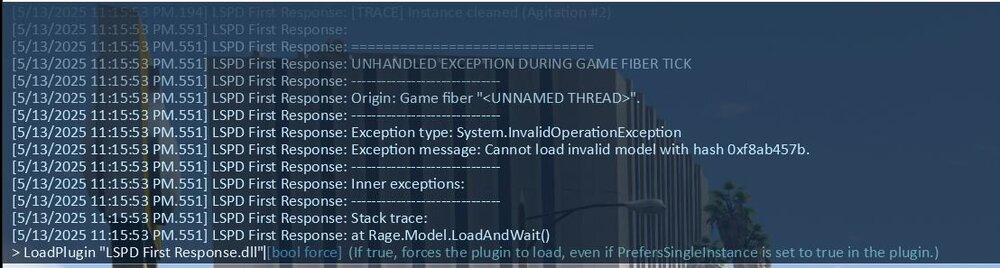
As the name suggests, within 2 mins on forcing duty I am getting this error and lspdfr crash. RagePluginHook.log
-
I recently did a fresh install and only installed a few mods. Not sure what is causing the game to crash. RagePluginHook.log
-
Ok so I found a way that worked for me (Follow at your own risk) 1. Make a copy of your mods, plugins, scripts, els, & w.e other mods, callouts plugins you installed into a seperate folder. Make sure you have a good enough pc and lots of space because this is going to take some time to copy back and forth. 2. Once copying is complete, uninstall gta5, ragehook, rockstar launcher and SDK and also open iv. Go to apps and programs and just look for it there. 3. Brace yourself! Delete your entire gta 5 game directory. 4. Re-install gta 5. When you first play it will download rockstar launcher and you will have to sign in. Next download open iv, els and lspdfr with ragehook. BUT DO NOT INSTALL IT IN YOUR MAIN DIRECTORY YET!! When i opened gta 5 the first time, it loaded the previously saved game so I didn't have to start from scratch to get to a save point. I then copied lspdfr and rage into the directory and tested the game. Once it loaded, i then copied the files from the mods folder (1 by 1) and tested the game each time. Eventually all my vehicle mods loaded back fine. Even my els pack default files copied fine with my custom light settings and sirens. Now I have to do the callouts and plugins but I will leave that for another day. It does sound like alot but to get the pleasure of playing tgis game again is worth it. I waited almost 3 weeks before i decided to do this and i wish i did it the first time. Hope this works for you guys!
-
ALOT lol. I ended up backing up my mods, plugins and scripts to another drive because I am about to restart from scratch lol. Would you like me to send screenshots of the callouts and stuff I have?
-
Since this new update, I am not able to launch the game. The Rockstar window shows up and loads then a message comes up that GTA 5 Legacy has crashed unexpectidly. I tried loaded RDR 2 from Epic Games and I am getting the same message. Any idea what could be wrong?
-
It was but based on some research i was doing, it seems like its an issue with the dinput file. So hopefully they update that.
-
I have a feeling it has to do with scripthookv. I'm constantly looking on the page to see if there is an updated release (fingers crossed). But yea if i see or hear anything i will dm you 👌🏾
-
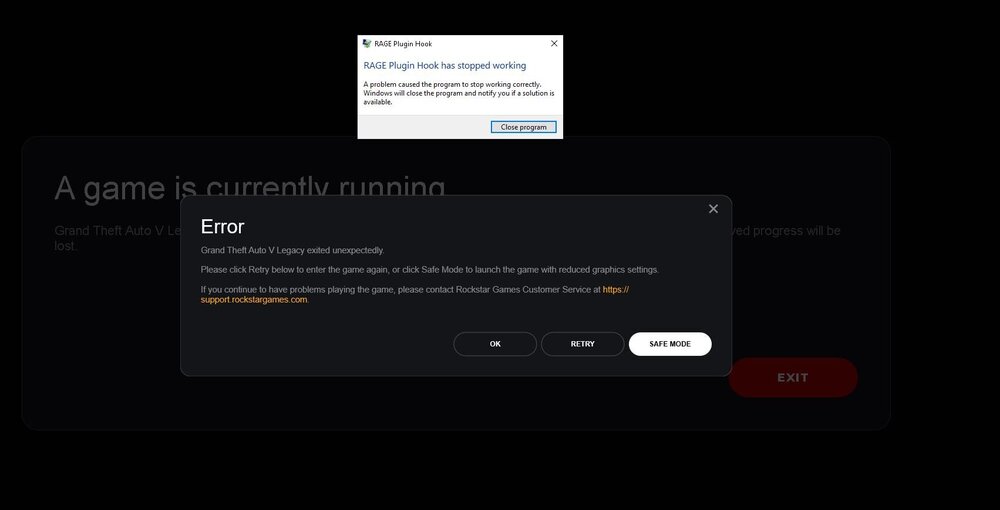
I just updated LSPDFR and RAGEhook as well as SCRIPTHOOKV and when I launch either the game from steam or ragehook from the main directory I am getting this error. Not sure what is happening but any help would be appreciated 😃
-
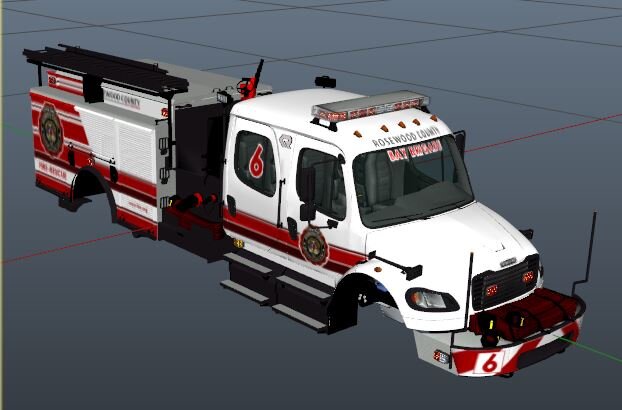
I am using Medic 4523's freightliner.
-
Hi, not sure if I posted in the right forum. Forgive me if I did not. I put in some add on fire trucks but when I go ingame, they do not work. Even when I look around the nozzle is just stuck in 1 position. Is there a file I need to edit? I copied the same vehicle meta from the original firetruk one but still no luck. Would appreciate any help. Thanks!
-
-
 Just tested out the new callouts. For the Supervisor requested one, when you accept the callout it goes code 4 right away. I tried accepting the call from different distances but still getting the same code 4. Could you look into it please?
- 352 comments
- 25 reviews
-
 This is PERFECT for a halloween episode! Can't wait to try these out.
 -
RagePluginHook.log Here is the recent one.
-
ok so I got another error, it apparently thinks I have callout manager in a D drive. Neither exist and I'm really confused where its picking up this file from.

-
RagePluginHook.logThis the most recent one. And to answer your question @57z nothing new just updated scripts.
-
RagePluginHook.log I did and its still crashing with the same error.
-
RagePluginHook.log
-
Does anyone know what the heck these lines are that are crashing my game? I would really appreciate it.

-
Does anyone have any idea what this error could be? I would really appreciate any help.