


Adr1an
Members
-
Joined
-
Last visited
Everything posted by Adr1an
-
I see. thank you so much for your response. 🙂
-
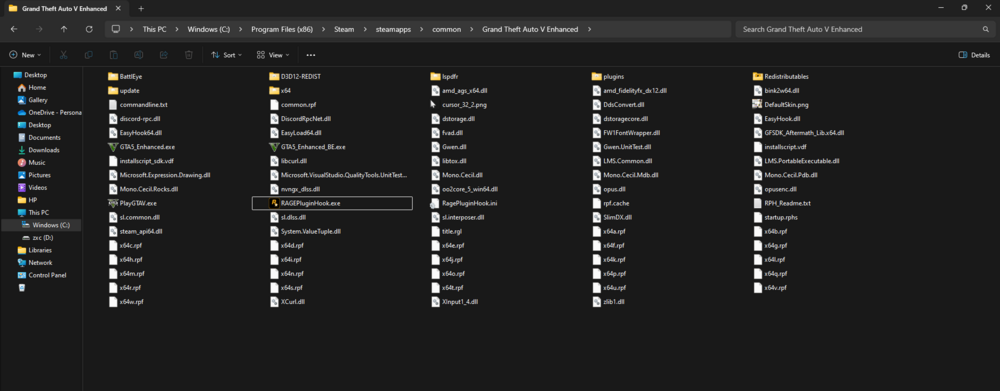
Hi all, I just downloaded the RPH but every time I launch the game, it gives me an error that the RPH is installed incorrectly. I bought the game on steam and I know where my GTA 5 game directory is. (C:\Program Files (x86)\Steam\steamapps\common\Grand Theft Auto V Enhanced) I already downloaded the Auto downloader and the Manual downloader. My GTA 5 has still no mods added but still it doesn't work.
-
So, I redownloaded gta 5 for the 5th time. I played without lspdfr and it worked fine, as soon as I added Range Plugin Hook and I start the game it kept popping up grand theft auto V is attempting to launch with Optional custom arguments -skipPatcherCheck -launchTitleInFolder "D:\Steam\Steamapps\Common/Grand Theft Auto V. If i hit continue it would load then go to a a crash screen. I looked through the code and i cant find anything. But If i start the game through steam W/O Rage it would load fine. I tired just about everything, I looked on different forums cant find anything.

