Skip to content
View in the app

A better way to browse. Learn more.

LCPDFR.com

A full-screen app on your home screen with push notifications, badges and more.

To install this app on iOS and iPadOS
  1. Tap the Share icon in Safari
  2. Scroll the menu and tap Add to Home Screen.
  3. Tap Add in the top-right corner.
To install this app on Android
  1. Tap the 3-dot menu (⋮) in the top-right corner of the browser.
  2. Tap Add to Home screen or Install app.
  3. Confirm by tapping Install.

zercastic

Members
  • Joined

  • Last visited

Everything posted by zercastic

  1. YESSSS IT FREAKING WORKED, THANK U SO MUCH DUDE, I APPRECIATE IT FOR THE FAST REPLIES
  2. yeah i've literally tried everything, even the verify game files integrity option, that leaves me with number 6 to my only hope. do i delete all my mods in my plugins and lspdfr files or just the ones on the rageplugin launcher
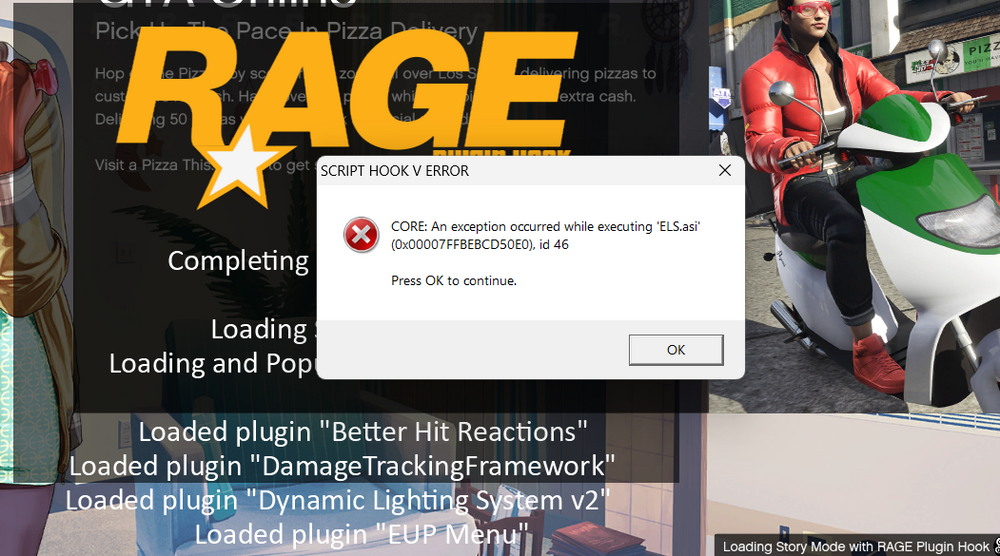
  3. Before telling me to download the newest file for AdvanceHook, I have done that...multiple times, I have been trying to fix the crash for the past day and I have made no progress. I have searched every type of tutorial on youtube and on this platform and nothing has worked, I've reinstalled ELS multiple times and ELS.asi continues to crash, I'm really in the need for some type of help before I have a mental breakdown, nothing has worked...PLEASE HELP ME
Account

Navigation

Search

Search

Configure browser push notifications

Chrome (Android)
  1. Tap the lock icon next to the address bar.
  2. Tap Permissions → Notifications.
  3. Adjust your preference.
Chrome (Desktop)
  1. Click the padlock icon in the address bar.
  2. Select Site settings.
  3. Find Notifications and adjust your preference.