


RedPhoenixKatherine
-
Joined
-
Last visited
Posts posted by RedPhoenixKatherine
-
-
2 minutes ago, tomboy230402 said:
Yeah already installed but it keep saying the same error message 😕
Did you install the correct version for your system? This error cleared up for me as soon as I installed the package. Also check HERE make sure you have everything installed.
-
6 minutes ago, tomboy230402 said:
After successfully installed LSPDFR (latest version) it keep saying this error when launching RPH and it says: "You're missing Microsft C++ Redistributable for Visual Studio 2015"
Forgot to add the screenshot x)

You need to download that package from microsoft get it HERE
-
Hi,
After having a very rough and very long period of my disability acting up I'm now back in LSPDFR. So I'm at that stage where I am building out my agencies more and I'm currently doing security. I have F3nt0n's brilliant pack but can not for the life of me find a pack I used to use.
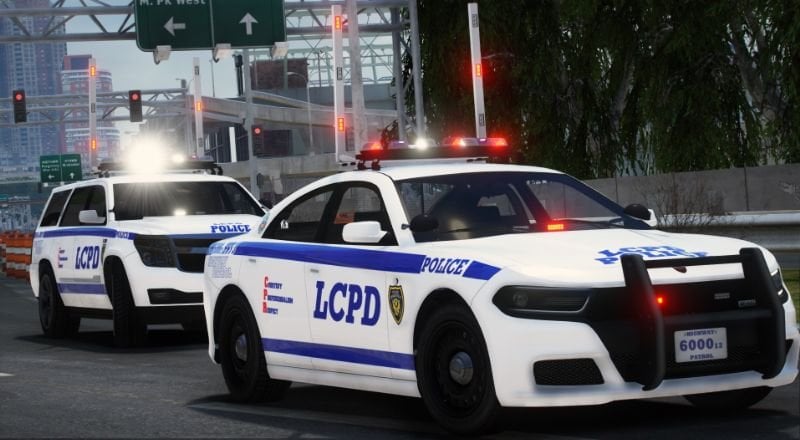
It was a security pack (Gruppe 6, I think (80% sure)) but could be merrywether. It was lore vehicles and had Diamond Casino, LSIA and Fort Zancudo. Now what made this pack unique was it had rotators similar in style to LCPD shown here but where amber and white.
I'm just getting back as I said and don't feel up to messing with carcols yet to reskin the LCPD pack ad change the reds to ambers (I'm still no where near 100% and can't focus for long due to my pain levels)
So if anyone knows of this pack and has a link or the mod itself I'd be eternally grateful
Katherine
-
-
To be honest yes it’s frustrating to wait BUT we get these mods and scripts free. People have their own lives to live and develop in their spare time, I’m just grateful for there contribution to the community.
Now I may have over done it installing mods while I waited lol. So I have some car old to edit!
-
36 minutes ago, Fixzi said:
Looks like your thing works for the moment, tried it with the RPH/LSPDFR fix for the new version, it worked, I restarted my pc to check if it was luck and it still woked, now I just need to wai for the ScriptHookV update, thank you mate!
I'm so happy it worked!
-
Mine did exactly the same, worked once in a blue moon, then crashed was incredibly frustrating! I'd excercise caution using administrator privlidges - make sure your anti virus/security suite isn't bypassed by it.
-
I was having the insufficient permissions crash too, I figured out it was the game and not my mods. So not expecting a reply I reached out to Rockstar and they told me to run Rockstar launcher as an administrator. I was dubious but battle eye already has kernel level access and my antivirus/security can monitor programs running with elevated privlidges, so f**k it.
It actually worked (from research it doesn't work for everyone) and GTA mow runs fine. Though damn Rockstar updated the game again so as you said were in for a wait.
-
-
-
-
Hi,
I installed LML and straight away I was getting crashes every time I launch the game. The game would start loading story mode then close.
I removed all asi files except performance patches and it still did the same, so I decided to do a fresh clean install of GTA. So with no mods, no LSPDFR no anything except performance patches it still causes the startup silent crash.
Here are my logs and screenshot of which patches I'm using
Thank you in advance for any help received

PoolManager_Startup.log ModManager.log vfs.log
Forgot to add my windows event viewer log
SpoilerSpoilerLog Name: Application
Source: Application Error
Date: 05/12/2024 10:23:59
Event ID: 1000
Task Category: Application Crashing Events
Level: Error
Keywords:
User: HILLY\johnc
Computer: Hilly
Description:
Faulting application name: GTA5.exe, version: 1.0.3351.0, time stamp: 0x6703d6ec
Faulting module name: unknown, version: 0.0.0.0, time stamp: 0x00000000
Exception code: 0xc0000005
Fault offset: 0x00007ff7fe78ad5c
Faulting process id: 0x0x3ED8
Faulting application start time: 0x0x1DB46FF97014BF8
Faulting application path: C:\Program Files (x86)\Steam\steamapps\common\Grand Theft Auto V\GTA5.exe
Faulting module path: unknown
Report Id: 299dbb5b-a877-4a4b-a2a5-96f258c68059
Faulting package full name:
Faulting package-relative application ID:
Event Xml:
<Event xmlns="http://schemas.microsoft.com/win/2004/08/events/event">
<System>
<Provider Name="Application Error" Guid="{a0e9b465-b939-57d7-b27d-95d8e925ff57}" />
<EventID>1000</EventID>
<Version>0</Version>
<Level>2</Level>
<Task>100</Task>
<Opcode>0</Opcode>
<Keywords>0x8000000000000000</Keywords>
<TimeCreated SystemTime="2024-12-05T10:23:59.9026467Z" />
<EventRecordID>13951</EventRecordID>
<Correlation />
<Execution ProcessID="16640" ThreadID="16372" />
<Channel>Application</Channel>
<Computer>Hilly</Computer>
<Security UserID="S-1-5-21-4029237382-2476354425-1350851282-1001" />
</System>
<EventData>
<Data Name="AppName">GTA5.exe</Data>
<Data Name="AppVersion">1.0.3351.0</Data>
<Data Name="AppTimeStamp">6703d6ec</Data>
<Data Name="ModuleName">unknown</Data>
<Data Name="ModuleVersion">0.0.0.0</Data>
<Data Name="ModuleTimeStamp">00000000</Data>
<Data Name="ExceptionCode">c0000005</Data>
<Data Name="FaultingOffset">00007ff7fe78ad5c</Data>
<Data Name="ProcessId">0x3ed8</Data>
<Data Name="ProcessCreationTime">0x1db46ff97014bf8</Data>
<Data Name="AppPath">C:\Program Files (x86)\Steam\steamapps\common\Grand Theft Auto V\GTA5.exe</Data>
<Data Name="ModulePath">unknown</Data>
<Data Name="IntegratorReportId">299dbb5b-a877-4a4b-a2a5-96f258c68059</Data>
<Data Name="PackageFullName">
</Data>
<Data Name="PackageRelativeAppId">
</Data>
</EventData>
</Event> -
Hi, my lights on 11john11's bcsd pack are badly broken. I've recently had to reinstall everything and I know I had a fix for the lights but I cant for the life of me find it.
Does anyone have it or know of it?
My fave sheriff back is now unusable I'd be extremely grateful if anyone has this or knows a fix
Thanks
-
-
Edited by GroundedOwl
3 hours ago, Joemar2009 said:Lspdfr loading forever at bottom right of screen
From what I can see (and I'll freely admit I'm new to troubleshooting with rage logs) you have a lot of errors. remove all of these to test your LSPDFR install then you can try reinstalling
EUP errors, you have multiple Invalid base variations, if you didn't change any of the outfits you prob have a bad EUP instal
Bases affected
Spoilerf_base for lguard_atv
m_base for lguard_atv
f_base for lguard_atv
m_raincoat for m_base
m_raincoat for m_base
m_raincoat for m_base
f_raincoat for f_base
f_raincoat for f_base
f_raincoat for f_base
m_windbreaker for m_base
f_windbreaker for f_base
m_raincoat for m_base
m_raincoat for m_base
m_raincoat for m_base
f_raincoat for f_base
f_raincoat for f_base
f_raincoat for f_base
m_windbreaker for m_base
f_windbreaker for f_base
m_riot for m_base
m_riot for m_base
m_senior
m_senior
m_seniorTry reinstalling either EUPFR Basic Configurations or EUPFR - Ultimate Edition
Then you have invalid vehicle models. You either, edited, removed or it didn't install properly
Vehicles affected
Spoilerpolimpaler5
poldorado
polimpaler6
poldominator10
Ipolgreenwood
polimpaler5
poldorado
polimpaler6
poldominator10
polgreenwood
polimpaler5
poldorado
poldominator10
polgreenwoodI'd suggest removing the dlc pack containing these and removing the entry in the dlclist and then if you want them still redownload and install this pack (but try loading LSPDFR without them first)
Finally you have a plugin throwing errors.
Spoiler[10/21/2024 4:01:33 AM.745] ScenariOh!: ScenariOh.AsyncUpdateChecker: Check: Waiting 32766 before update check
[10/21/2024 4:02:17 AM.396] ScenariOh!: ScenariOh.AsyncUpdateChecker: MostRecentVersion: Unable to get most recent version from endpoint https://s3.eu-central-1.amazonaws.com/peteru-lspdfr/scenarioh-version: System.Net.WebException: The request was aborted: Could not create SSL/TLS secure channel.
[10/21/2024 4:02:17 AM.396] at System.Net.WebClient.DownloadDataInternal(Uri address, WebRequest& request)
[10/21/2024 4:02:17 AM.396] at System.Net.WebClient.DownloadString(Uri address)
[10/21/2024 4:02:17 AM.396] at ScenariOh.AsyncUpdateChecker.MostRecentVersion()
[10/21/2024 4:02:17 AM.396] ScenariOh!: ScenariOh.AsyncUpdateChecker: MostRecentVersion: Failed to retrieve a Version from any update endpoint.
[10/21/2024 4:02:17 AM.490] ScenariOh!: ScenariOh.AsyncUpdateChecker: Check: Unable to check for updates. Sad!Remove this plugin and if you have had the game working with this plugin reinstal it (after your clean LSPDFR test)
Hope this helps
-
Edited by GroundedOwl
22 hours ago, Life Is Fabi said:I did everything you said, but it keeps crashing.
You need to post your rage plugin log. That'll hopefully give details as to what's going on. I'm hardly an expert but I'll take a look and hopefully someone with more knowledge will as well.
Note you want the log from the main directory not the logs folder and follow the advice from Yasd it's not going to be the dll file causing the issue it's either something in your mods folder or one of your asi's
-
3 hours ago, Phoenixbursche said:
Thank you!
I was reffering to more hairstyle for the Player because the NPC's use some that aren't available for the player. See attachment.
At least not with just the LSPDFR mod.
Ok I see what you are saying, I think those are in the ped model so apart from going through every ped it'll not be possible for the mod to load them.
Not sure but that's my guess
-
5 minutes ago, Life Is Fabi said:
Could someone please help me?
If i want to start GTA V, my game is crashing while in loading screen.
But when i remove the dinput8.dll file, it starts normal
I have had this happen before, I fixed it by opening OpenIV, uninstalling all three entries under ASI manager.
Close OpenIV, reopen it, then reinstall everything.
That's what fixed this issue for me, I hope it does for you!
-
On 10/18/2024 at 12:59 PM, Phoenixbursche said:
More (female) Hairstyles in the LSPDFR Character creator.
Make the Online weapons available for purchase at the gunstores - or make them equipable at the police stations.
Thank you!GTA 5 Mods has a lot of hair styles, use Femalemods to add them into the game. Make sure you change the number starting with 000 and going up
-
-
-
I've had similar issues with custom peds, i now use Addon Peds and its works for me. You can get it HERE
-
-
Scripthook has been updated and is available here
The website is back up and running so no console needed!





Missing dependency
in LSPDFR 0.4 for Legacy Edition Support
Only thing I can think of is to rerun the launchers for the dependencies to make sure they installed properly (I've had that happen to me a couple of times), make sure you reboot and run windows update.
I honestly don't know what else to do except reinstall Rage it's self from there DISCORD and if you still have no luck there discord is a great place to get further support.
Sorry I couldn't help more
Great! Windows being Windows!
Glad it's working