EliteCobraTyler
Members
-
Joined
-
Last visited
Everything posted by EliteCobraTyler
-
I am wanting to set to where there can be a certain vehicle and skin for a certain area. Like example, the beach has a certain vehicle and skin, Vespucci has a certain car and skin, davis has a certain car and skin, etc. How can I do that? Also is it possible to add in the extra addon police vehicles to a certain area?
-
I had a issue with the downtown bank heist. I went to secure a hostage and it was doing some weird animation to where in the end of the animation he was getting into a car. Weird so yeah.
-
I have had this happened before to me. For the reason the cops don't care about the suspect is because you don't really have him called in(you can do so by pressing and holding B). If they still don't care when it is like a pursuit mode, then check your trainer for Police Ignore Player and Cop don't dispatch(if they are enabled, then disable them). As for the security guard, by GTA V default they will shoot at anyone who shoots, they are like the gangs near grove street except its one security guard. And when you see a crime being commited do as I said before and call it in by pressing and holding B. So the reason why you couldn't pull that person over is cause you saw him commit the crime, so from what I believe its no matter what a pursuit, you just have to call it in.
-
Yes its every vehicle and its only lspdfr. I went to regular single player and it doesn't do it. Went into GTA IV and even ATS and GTA SA and it doesn't do it. It does it with every vehicle.
-
Bump(really need to figure this out please help)
-
@Sam @Cyan Here is a video of it maybe you guys know something?
-
nothing is stuck. I have both of my keyboards on, my laptop and my wired keyboard. As I am typing this no A is being typed besides what I am typing. My controller is not stuck neither and I know cause it only happens when I gun the gas. When I am still the wheels are not turned or anything.
-
Title says it all. After coming into game, I spawned with my character conducting a traffic stop. After that like literally no joke, my character has been steering the car to the left immediately. When I go slow it doesn't happen as much but it goes to the left out of no where. When I am at a complete stop and I drive then stomp on the gas it immediately turns left. Is anyone having this issue? If not, is there a fix for it?
-
So I had setted up the LSPDFR Sync for my character. But when I go to check out my character and all I cant see my character. Why is that?
-
 Is there a discord server I can speak to you about how to install this and making to where it doesn't crash. I am still learning about 0.4 and its kinda a tough road
- 13 comments
- 1 review
-
 I cant seem to get the patches on the side, like example the Rockford hills police patch, the lspd police patch, etc. How do I do that?
- 195 comments
- 24 reviews
-
Ok so I have installed 0.4 and everything into my game. Now I have an issue with it. I don't know if its because I didn't reinstall my game into a new fresh clean game or not. But pretty much I go into the game and it gives me the original GTA V Menu screen (like where you can select online, story mode, settings, etc). I thought that it was part of the game so I let it go. I clicked story mode and next thing is while it says "LOADING LSPDFR" it freezes and LSPDFR crashes. I try reloading all plugins still crashes. It gives me an error saying LSPDFR was terminated cause it caused the game to freeze. It said that the freeze of LSPDFR came within LSPDFR main fiber. So I don't know if its because I still have mods from 0.3 or not. So if you know something please help me. (It wouldn't let me post this in LSPDFR 0.4 Support for some reason, it was greyed out)
-
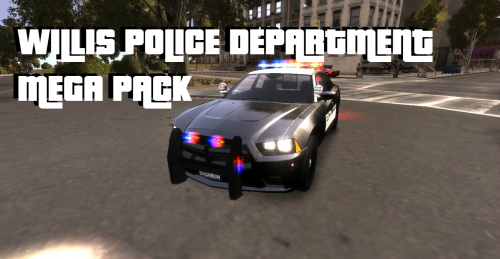 I have installed the cars but it seems to me that when the red and blue flashes there is also a white light that flashes vise versa as well. So like if blue is flashing then the white is where the red is. When the red is flashing the white is where the blue is. Why is that?
- 11 comments
- 4 reviews
-
-
-
Ok so im trying to look for the whelen justice lightbar. does anybody know where its at? I go to gtapolicemods and go to bxbugs stuff but it says there is 31 files but it only gives me 2. does anybody know why?
-
Ok so i have tried to look for the whelen justice lightbar but i cant find it no more. it isnt on gtapolicemods no more. does anyone have it
-
-
The models i give credits too. Like your ambulance i would give credit too. I dont take credits for something i didnt make. The police and fire skins i made. the ems skin was made by someone else. it just wont let me upload the file. it keeps on failing. i might jsut put it on mediafire and post a link to it. but as i said some of the cars i dont have links to cause they were taken down so pretty much i give credits to it and say that i didnt make the cars. and also i actually need a new processor
-
-
-
Hey guys. I know that you guys saw my first video of the pack and that some stuff was messed up. Well here is a video with everything that will be in the pack but also pictures of some of the vehicles. I hope you enjoy. Go subscribe to my channel to see more updates. I replaced some vehicles and fixed some textures that was messed up. Sorry about the 5 fps, but at least you can still see the skins. Tell me what you think.
-
If you want to get updates on the NC Pack and future packs that I will make. Go to this site and follow instructions. http://pdfs.remind101.com/invite?class_code=coachcobra&class_name=Cobra&phone_number=%28336%29+447-3557&user_signature=Coach+CobraTyler Sorry the website is actually http://pdfs.remind101.com/invite?class_code=coachcobra&class_name=GTA+IV+Packs&phone_number=%28336%29+447-3557&user_signature=Coach+EliteCobra. Please follow instructions. You will get the first notification on new Packs that I will release.
-
Thanks for the support keep supporting. And the cars are not made by me. I found them on here and on gtapolicemods.com I just created the skin. And yes I know some cars need work, I did fix the impala skin so its much better now. This is just version 1. There will be more cars added in version 2 and up. And @Damein yes its just like Greensboro PD. I can always get High Point Police in it too in the later versions same with Guilford County Sheriff. All i need is just pictures of the cars. And I can try to do High Point Fire and Guilford County Fire too. But the engine and ladder are based on Station 7. The rescue and HAZ-MAT are Station 5. I will post a video up tomorrow hopefully of what I have so far. I hope you enjoy
-
I am in the making of a car pack for Greensboro, NC. I am from there so I did this only one picture. The firetruck skin i did by heart cause I couldnt find a good picture of a greensboro fire department truck. So i did it by what I know it looks like. I hope you enjoy it when its released. And also you will need to change the handling for some cars to put it to your specifications. Here is a video I created showing the cars I have now.