SneacsX
Members
-
Joined
-
Last visited
Everything posted by SneacsX
-
Ja war alles hoch gestellt und hatte es auch schon mit Brighter ELS probiert und ASI Manager neu installieren alles drum und dran und am ende habe ich einfach nur RadiantV installiert und das hat geklappt aber Danke 🙂
-
did you install any Addon Cars or just change some DLC datas?
-
jedes mal wenn ich mich ein Auto näher dann wird das Blaulicht sehr schwach, wenn ich allerdings weiter weg gehe vom Auto dann scheint es normal (mit der Mod die ich installiert habe, Better Emergency Lightning) Ich dachte das ganze würde sich verändern wenn ich die Very Bright statt die Bright Mod installiere aber es bringt einfach nichts. Es ist wirklich egal welches Auto ich benutze, ob Add-ons oder Replace Autos es macht keinen unterschied. (Youtube:
-
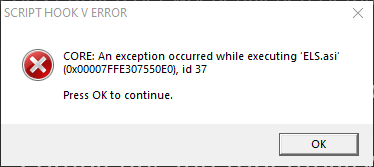
Jedesmal wenn ich LSDPFR mit ELS starte kriege ich folgende Fehlermeldung: CORE: An exception occurred while executing ´ELS.asi´ (0x00007FFE307550E0), id 37