RymiiAF12
Members
-
Joined
-
Last visited
Everything posted by RymiiAF12
-
-
Idk any its 2025 now and i still dont know any.
-
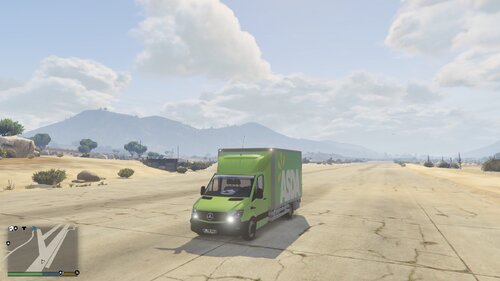 Hi there! This is a skin for https://www.gta5-mods.com/vehicles/m-b-sprinter-facelift-transporter-template-downlaod-link-topmods This is UK Based and my first mod so it wont be perfect! Installion: First download: https://www.gta5-mods.com/vehicles/m-b-sprinter-facelift-transporter-template-downlaod-link-topmods and install the vehicle. drag the .dds images from the skin folder to ur desktop Then go into the vehicles '+hi.ytd' File and replace 'car_sign_1' and 'car_sign_2' with the dds files. Do the same with the OTHER YTD and that's it! Enjoy! NOTE: THIS IS MY FIRST MOD SO IT ISNT PERFECT. ALL VEHICLE CREDITS TO TOPMODS. SKIN BY ME. Credits: Vehicle model: TOPMODS Vehicle skin: ME Enjoy
 -
Thank you for this fix.
-
I Keep getting an issue with grammar police that says the speech engine could not run please consult the RagePluginHook.Log file