CrunchyMan
Members
-
Joined
-
Last visited
Everything posted by CrunchyMan
-
 Yeah, I learned that in the discord ticket. Thanks for the reply.
 -
What's new in this release that's diferent than the release by Bay Modifications?
-
 While this is a well made resource, I’m finding it difficult to see where in a RolePlay scenerio this would be used.. Well done, however!
 -
 Yeha so I forgot to mention, No I do not have any client modification that uses graphics.ytd and no, I have no resources that uses graphics.ytd. This issue is still persistent in my server so i'll go through my resources to make sure on more time but I honestly doubt I got anything thats overwriting it. Thanks.
 -
 I'm saying good work? You made a nice resource.
 -
Wow! I don't know how I didnt come up with this! Amazing work!
-
-
 Excellent work!
 -
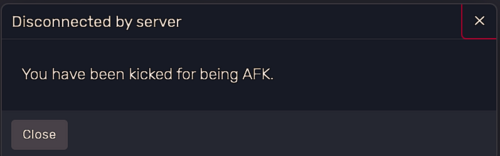
 Keep your server lively with AFK Kick! This script helps manage player activity by auto-kicking those who stay idle for too long. It’s perfect for keeping your server active and engaged. Features: - Adjustable AFK Timeout: Choose how long a player can be idle before being kicked—default is 10 minutes. - Test Mode: Switch on Test Mode to kick players after just 15 seconds of inactivity for quick testing. - AFK Warnings: Option to notify players when they’re close to being kicked, with customizable warning messages and time thresholds. - Prevent AFK Kick: Players can use the /afkbypass command to stay marked as active and avoid being kicked. - Custom Kick Message: Tailor the message players see when they’re kicked for being AFK. Configuration: - Enable or Disable the AFK Kick Feature - Set Timeout Durations for Regular and Test Modes - Customize Warning Messages and Thresholds - Define the AFK Prevention Command Installation: Drop the cr-afk folder into your resources folder. Add the script to your server configuration (server.cfg). Edit config.lua as needed for your server setup. Note: This script is shared for free with the community. Please don’t claim it or its code as your own. Acknowledge the work that went into creating it. Bugs & Feedback: If you find any bugs, issues or have any suggestions, consider letting me know. Your feedback is valuable and helps me improve my scripts. Feel free to comment or reach out directly with any issues.