Skip to content
View in the app

A better way to browse. Learn more.

LCPDFR.com

A full-screen app on your home screen with push notifications, badges and more.

To install this app on iOS and iPadOS
  1. Tap the Share icon in Safari
  2. Scroll the menu and tap Add to Home Screen.
  3. Tap Add in the top-right corner.
To install this app on Android
  1. Tap the 3-dot menu (⋮) in the top-right corner of the browser.
  2. Tap Add to Home screen or Install app.
  3. Confirm by tapping Install.

SnipeSD

Members
  • Joined

  • Last visited

Everything posted by SnipeSD

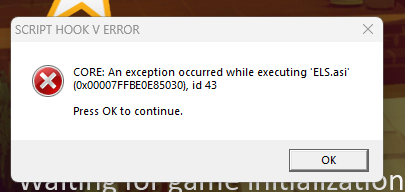
  1. Beim Starten nach dem Hauptmenü bekomme ich den Script Hook V Error, dass eine Exception beim executen von ELS.asi enstanden ist. Der AdvancedHookV Patch auf der Seite von ELS wurde bereits installiert Ansonsten habe ich auch schon probiert: ELS neuinstallieren ELS 1.0 zu installieren Neues ScriptHook installieren(keine Ahnung ob das was damit zutun hat) Alle xml der Fahrzeuge zu entfernen (da es bereits beim Starten ist, wäre es komisch wenn das was ändert, aber mir sind die Ideen ausgegangen) Die Log Datei von AdvancedHook ist nur wiederholt: Die Log von ELS ist der Header und einmal: Weiters nute ich nur den pack_default Ordner für die xml und habe keinen extra erstellt
Account

Navigation

Search

Search

Configure browser push notifications

Chrome (Android)
  1. Tap the lock icon next to the address bar.
  2. Tap Permissions → Notifications.
  3. Adjust your preference.
Chrome (Desktop)
  1. Click the padlock icon in the address bar.
  2. Select Site settings.
  3. Find Notifications and adjust your preference.