NUCLEARLSD
Members
-
Joined
-
Last visited
Everything posted by NUCLEARLSD
-
Emu is just an abbreviation for 'emulator', in this case referring to some software that just makes your PC system seem like another to other applications. Steam emulators are used to run steam games independent of steam itself. The emulator handles all interactions between steam and the game (i.e. the steam API calls), so one doesn't need steam anymore to play steam games. One less launcher off your system and no need to be online to play any of your games. If one has the steam version of GTAV, one can use it to rid themselves of steam. The social club emu I used is so I don't need the rockstar launcher to play; a lot of pirated GTAV releases rely on this to essentially bypass any license checks done by the rockstar launcher, but I had a legit copy from EpicGames, I just didn't want to have 2 launchers (epic and rock*) to play GTAV, so I used the social club emu - ridding my need of them. As I said, doing this will make RPH crash on load, so one has to unfortunately use a bajillion launchers to make RPH work with GTA V. I should have mentioned that there are multiple ways of 'reinstalling Windows' per say: https://support.microsoft.com/en-gb/windows/reinstall-windows-d8369486-3e33-7d9c-dccc-859e2b022fc7 ^ As explained above, 'Reset Windows 10', 'Reinstall Windows 10 using installation media' and 'Clean install of Windows 10 using installation media' are all options, but only the latter is enough to fix whatever system files windows-defender-disabling scripts may have botched up. If you haven't ran any such scripts you won't need to do this. Though you can try the second option 'Reinstall Windows 10 using installation media' as it will keep all of your installed applications and personal files, only modifying Windows system files.
-
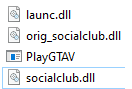
Do you have the latest GTAV update installed (3274) and the latest LSPDFR/RPH? Do you also have a legit copy of the game and are NOT using any social club emu / steam emu? I have been trying to get RPH to work for a few days and there were multiple reasons why RPH would crash on loading story mode, one of them being that I was using a social club emu so I wouldn't need 2 different launchers (EpicGames and Rockstar) to play GTAV. I have a legit copy of the game, obtained through EpicGames. Story mode would work just fine with the social club emu (without RPH); however, installing RPH would yield crashing each time on loading story mode. No problems with hooking. No gameconfig.xml, memory heap increase, package increase mods helped - one does not need them on a clean GTAV and RPH. Have you ran scripts which have disabled windows defender or removed it before? Doing so (as I did) meant I could no longer run any applications as an administrator, being one of the causes for RPH (and many other applications) to fail to work. Doing a clean windows install fixed that issue (using a bootable win10 USB repair/upgrade will not work, you need to clean install windows again i.e. format your C:/ partition). Those 2 fixes were necessary for RPH to work. The social club emu in question was 4 files added to the GTAV root folder, one of them replacing PlayGTAV executable.