Skip to content
View in the app

A better way to browse. Learn more.

LCPDFR.com

A full-screen app on your home screen with push notifications, badges and more.

To install this app on iOS and iPadOS
  1. Tap the Share icon in Safari
  2. Scroll the menu and tap Add to Home Screen.
  3. Tap Add in the top-right corner.
To install this app on Android
  1. Tap the 3-dot menu (⋮) in the top-right corner of the browser.
  2. Tap Add to Home screen or Install app.
  3. Confirm by tapping Install.

tazh1

Members
  • Joined

  • Last visited

Everything posted by tazh1

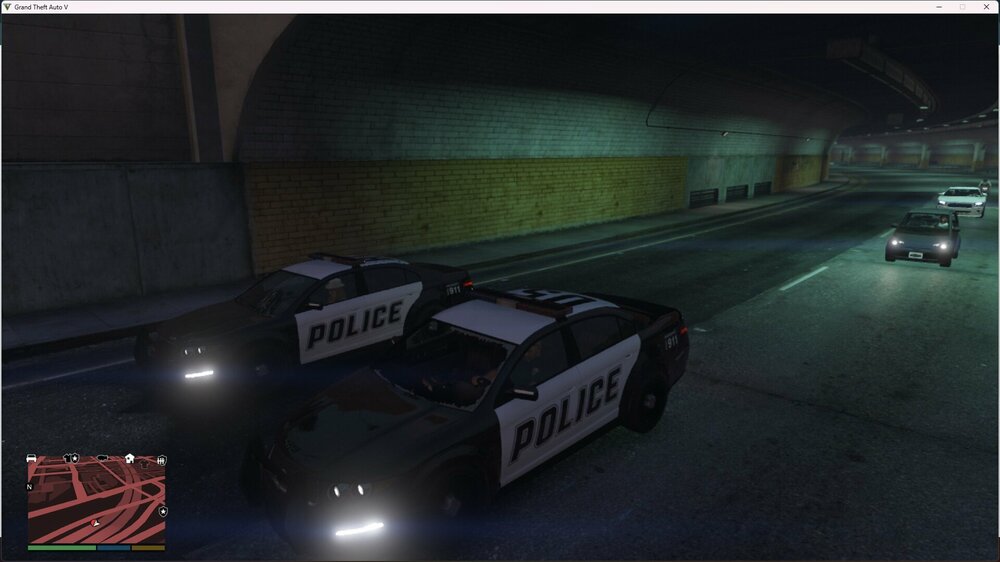
  1. Hello everyone, has anyone ever had this? Civilian NPCs spawn in a police car (namely Police 3) and the pursuit begins automatically. I deleted all previously installed vehicles, restored the original vehicles meta file, removed plugins and scripts, nothing worked. The only thing I did was backup patch 3179 yesterday (I have epic games). Could this be the reason? It’s just that no one else has this problem, or at least no one writes about it
Account

Navigation

Search

Search

Configure browser push notifications

Chrome (Android)
  1. Tap the lock icon next to the address bar.
  2. Tap Permissions → Notifications.
  3. Adjust your preference.
Chrome (Desktop)
  1. Click the padlock icon in the address bar.
  2. Select Site settings.
  3. Find Notifications and adjust your preference.