JoeyOnPatrol
Members
-
Joined
-
Last visited
Everything posted by JoeyOnPatrol
-
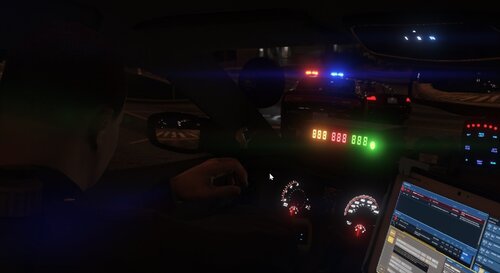 The ASC doesn't seem to be working when set to =true. Not sure if anyone would have a fix. The traffic lights turning green seems to work though.
- 395 comments
- 30 reviews
-
 If you’re referring to NexusMDT, I think JonJon is somewhat strict on people altering/changing his plugin - I could be totally wrong and I won’t do anything without permission. We’ll see what I can do!
 -
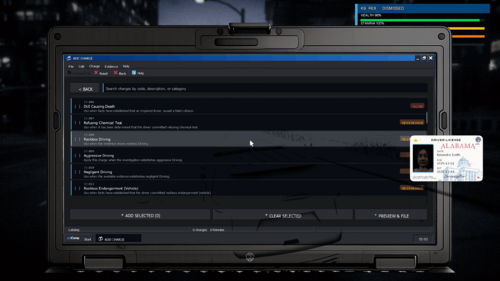
No, these are the charges and citations from NexusMDT converted to work with pdComp.
-
It will work with any graphics mod. This is simply a replacement for pdComp's charges and citations.
-
I have moved every charge and citation from JonJon's NexusMDT (with permission) and converted it to work with pdComp! You will find over 750+ new charges and citations to keep that doomscrolling satisfied! These replacement files will work with 10-21 as well. These charges and citations very closely resemble California style orientation. If you guys would review/follow me that would be great as I am new to the uploading community and this took a good amount of time transferring everything to work with pdComp! I do not own or claim to own pdComp or NexusMDT in any way. *My QuantV/ReShade settings are the reason you can see the vehicle through the screen. This has no effect on the Charges or Citations*
-
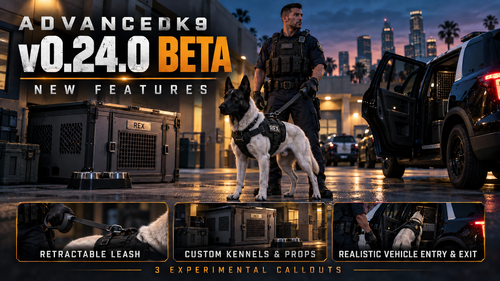 Rex got in my car and drove off. No joke..... Wish I could drop the clip in here. Love this so far!
- 60 comments
- 5 reviews
-
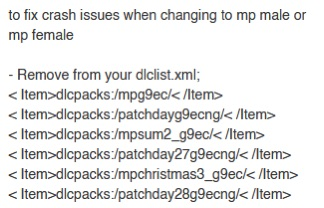
I have fixed the issue thanks to YeetsGrenade! I had to remove these from the dlclist.xml. Make sure you're running the most current gameconfig and pedlimitadjuster.
-
Yeah of course, here's the RPH crash report and here's the RPH log. RagePluginHook.log RAGE Plugin Hook v1.131.1424.17745.txt
-
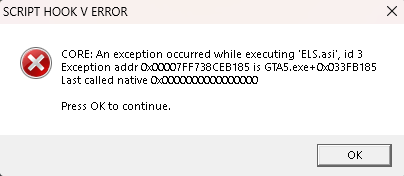
All my mods are up to date and current. When I try and add any EUP DLC clothing I get these errors. I can add DLC cars, etc... with no issues. My friend and I have identical game setups, a few different mods here and there, but I have QuantV and he doesn't. He's able to add EUP DLC clothing without issue. I'm lost as to what I need to do to fix this. I have reinstalled EUP completely and still no fix. My ELS works perfectly fine too... Any help would be greatly appreciated. I've included my ELS log, my ASI log, and my RagePluginHook log. asiloader.log ELS.log RagePluginHook.log
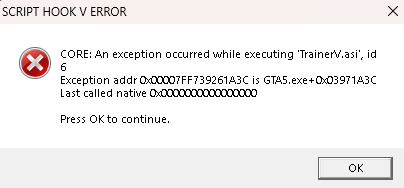
-
You need to use the AdvancedHookV file that's INCLUDED with the ELS download, not the singular version that it shows when you go to download ELS. There's issues with the current version of AHV at the moment.
-
Yes sir that fixed it. Thanks ❤️
-
I installed Super Callouts and 686 Callouts which do load in but F8 or F12 do not open the callout menu. Is there another key I seem to be missing? RagePluginHook.log
-
Sounds good I’ll try this after work.
-
Every time I start single player with Rage Plugin Hook the game loads in and then First Response crashes before I can spawn in. This is a fresh copy because the newest title update ruined my game previously. I only have Stop The Ped, Ultimate Backup, Simple Trainer, and CompuLite installed. Any insight would be appreciated, I hate I had to start from scratch in the first place! RagePluginHook.log
-
Can't play the game anymore it seems to crash every time I try to load into LSPDFR. Here's my Ragehook log.... RAGE Plugin Hook v1.110.1340.16576 .txt
-
Downloaded Heap Adjuster, Packfile Adjuster, and the latest game config and the game crashes but now it's not because of the memory issue. Here's the crash report. RAGE Plugin Hook v1.110.1340.16576 .txt
-
I'm not sure if it has to do with the new update or not, never really had issues beforehand. Anywhere between 5-15 minutes of playing, the game will either crash or it states "Out of game memory". What's a good way to fix this issue? I've been looking around and I'm not really finding any solid methods. Maybe the .log will help, maybe not. Thanks, this community is awesome! RagePluginHook.log
-
Sounds good, that was one of the viruses detected. Also I turned firewall off and it started up RPH. Thanks I gladly appreciate it sir!
-
Just got 3 viruses after downloading all the files to do this. They've been quarantined. Disabling my antivirus is the last thing I want to do now. Not 100% sure the 3 threats that we're found we're from the downloads but it happened after directly after downloading them. Coincidental but who knows.
-
I've updated all the files necessary to run LSPDFR with the latest title update. I got into the game once and everything worked as normal but now when I launch the RPH it says "Validating Hook" and closes almost instantly. I'm stuck as to what I should do from this point. Any help would be greatly appreciated. TIA!
-
I downloaded N.V.E. and installed the LSPDFR compatibility pack along with it. I also have "Make Visuals Great Again" installed which works fine in LSPDFR. Don't know if that effects it or not. I can load into regular GTAV story mode with N.V.E. but not through Rage. Is N.V.E. just a headache to use with LSPDFR or is there a good way to fix it? I did make a backup folder of GTA before installing N.V.E. Thanks, any help would be appreciated. RagePluginHook.log EDIT: Upon using the N.V.E. uninstalled included with the download it uninstalled the "Make Visual Great Again" mod along with it. Not sure what else it could've uninstalled with it so be careful and make sure you create a backup folder before installing it.
-
So I downloaded the Lidar Gun by Opus and seem to have issues with my grammar police now. Upon first launch it said I was missing the files for G.P. I then replaced/reinstalled the G.P. files and launched the game to find it working again. It worked fine until I exited GTA and launched the game back up. I'm now met with G.P. saying speech isn't set up. Is the Lidar not compatible with G.P. or is there any good way to fix this issue? TIA! RagePluginHook.log