



babyzim
Members
-
Joined
-
Last visited
Everything posted by babyzim
-
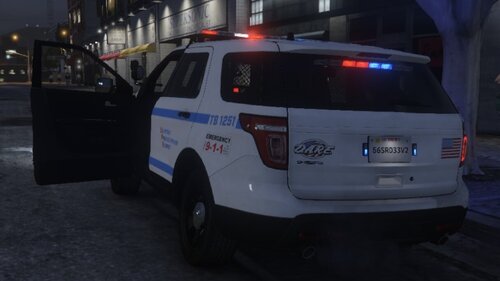 A simple livery I made for my own pleasure, decided to share it here. Made for Danz' FPIU '2013 Utility (readme included now whoops) REQUIRED: Download here: '2013 FPIU Utility by DANZ Originally, I made it to match this Mega Pack by WilsonTheIrish OPTIONAL: Download it here: San Andreas Mega Pack
 -
.thumb.jpg.61de846de400ca98f85d205992527de1.jpg) Sorry for such a late response probably won't help anymore but to anybody else that has issues with flashing extras in ELS, you can change the XML file in GTAV>ELS>pack_default Find the XML file for the car with which you have issues and open it. (for this car, it should be police2) Change IsElsControlled from "true" to "false" for extra 6. If the issue occurs for other extras repeat the process for extra 10, 11, and 12
Sorry for such a late response probably won't help anymore but to anybody else that has issues with flashing extras in ELS, you can change the XML file in GTAV>ELS>pack_default Find the XML file for the car with which you have issues and open it. (for this car, it should be police2) Change IsElsControlled from "true" to "false" for extra 6. If the issue occurs for other extras repeat the process for extra 10, 11, and 12- 265 comments
- 83 reviews
.thumb.jpg.61de846de400ca98f85d205992527de1.jpg)