BLK385
Members
-
Joined
-
Last visited
Everything posted by BLK385
-
whenever i try to load the game it crashes instantlyRagePluginHook.log
-
Hey man please reply i have no idea what to do.
-
just tried that and it worked what do i do now? when i tried launching it normally it crashed on the same loading screen again.
-
hey man games keeps crashing again i did everything you told me to do i even disabled my mods folder and that didnt help, the game crashed earlier on startup but this time it crashed on the" loading with rage plugin hook" screen and then blackscreened and shut down RagePluginHook.log
-
-
hey man thanks for all the help, i figured out that a map mod was causing the issue so i just deleted it. thank you so much i hope you have a wonderful day! Hey man game keeps crashing again i disabled my mods folder and that didnt help. RagePluginHook.log game crashes on startup with rph, and crashes when loading story mode without rph.
-
Alr man, but when i load into the game all of my modded vehicles work and also all of my addon vehicles, but do you think it could be an issue with an environmental mod like forests of san andreas or smth like that. EDIT: TYSM man disabling my mods folder fixed the issue. By deleting everything from my mods folder do you mean everything like the dlc packs, update, x64, or should i just entirely delete my mods folder and start from scratch.
-
-
game runs fine through steam but black screens and crashes instantly with rage plugin hook.
-
my game crashed a few seconds after loading all my plugins in through the F4 menu. RagePluginHook.log I tried launching my game again and it just crashed instantly on startup.
-
rage crashes gta5 after the three little bufferring things, but the game runs fine without rage any help please! RagePluginHook.log
-
solved it, simple cntrl was causing it to crash
-
Click dont load any plugins on startup in the rage plugin hook menu.
-
so rph was working perfect untill today the game just wont work with rph but when i just launch the game with steam it works perfect, please help.
-
Ok i'll remove my vehicle packs, and what do you mean by last 2 mods?
-
I'm having the exact same issue and well i've done everything that you did. wait for a couple of days until you can figure something out other than that, the only thing i can suggest doing is deleting your game directory and doing a fresh start. I know it's not ideal but it'll probably fix the issue that you're experiencing. I'm pretty sure this is an ongoing problem in rage plugin hook because i've seen lots of people make threads about the same exact issue in the past few hours, have a good night and i hope this gets resolved!
-
So i did that and well it did nothing, the same thing happened i tried renaming my mods folder to _mods and that didnt fix it either so i have no idea what the issue is anymore.
-
Ok i'll tr that out and let yk if that works
-
I have done that, also i deselected all plugins and the same thing happened. What patchday should i be using i'm currently using 25 for vehicles and 8 for guns, so could it be a something to do with the patchday? But if nothing works i might have to do a clean restart. :D
-
i just redownloaded gta5 and just got it to work, and then i downloaded some car mods and plugins and some weapons, ( i also have script hook v and script hook v dot net, heap adjuster, game config, and packfile limit adjuster) please help i dont want to do a fresh install again. the game crashes legit on those 3 little buffering things on startup. doesnt even get past that ill try to attach the crash report.
-
Alright man i'll try that thanks for your help Appreciate it
-
Before i re-installed the game everything worked completely fine after i did so nothing did, i think it's because of the new game update but im not sure Just tried launching the game and it instantly crashed on initliazing game files
-
I've loaded up storymode and even when i do that still none of my cars, guns, sirens, or anything i did in openiv loaded in. I've even re-installed openiv and still nothing i do in it loads up in game it's like the game isn't detecting openiv as an application.
-
I had my game downgraded and it just suddenly stopped working a few days ago. So basically it would load up all fine all the plugins would load up on the loading screen and suddenly it would just black screen and turn off gta5, like so crash log or nothing it would just turn off. So that's the reason i decided to uninstall the game and upgrade the game version but after that happened anything i edited in openiv would not show up in game.
-
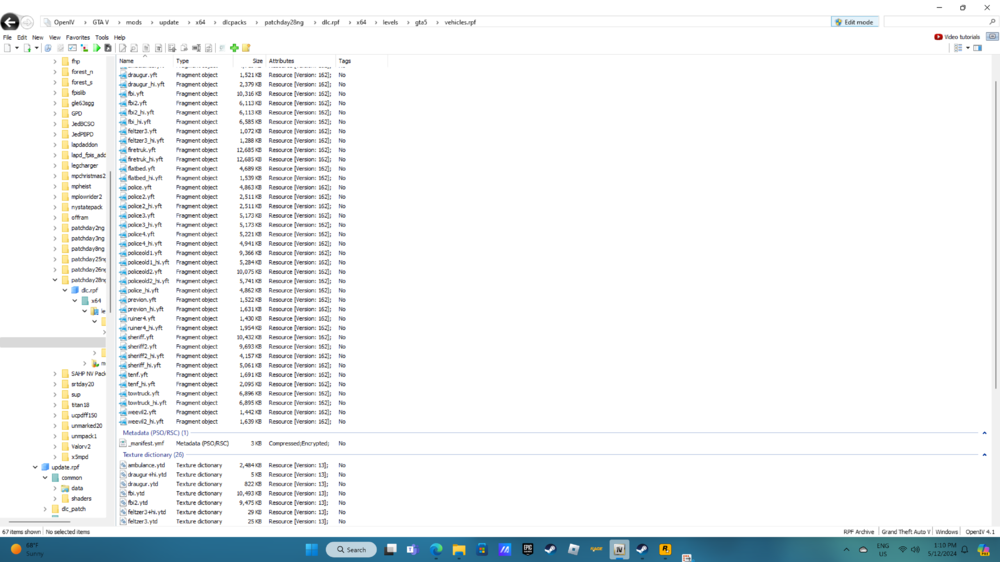
so a couple a day ago i reinstalled gta5 as i usually do from time to time. Everything usually works perfectly fine but this time nothing i did in openiv showed up in game, my vehicles were not working so i moved them from pchday 25-28 and that didnt do anything and i reinstalled simple trainer and eup those didnt work either i reinstalled my sirens didnt work either so everything i do in openiv wont work, and i also did update my game version and reinstalled script hook v. It might be a problem with my mods folder but i dont know. I also checked my dlclist.xml everything was loaded in that, i'll also attach some photos of my open iv