Biplop
Members
-
Joined
-
Last visited
Everything posted by Biplop
-
-
-
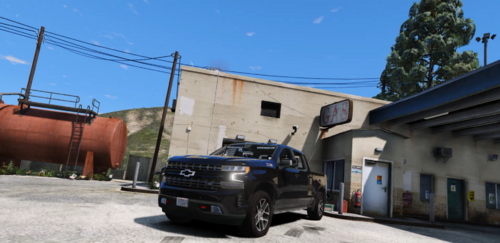 How to get this for single player?
 -
-
I recently installed LSPDFR and installed all the mods that I was using before (all are updated). My game loads fine to where we click "load with RPH." After clicking load the game crashes RAGE Plugin Hook v1.110.1340.16576 .txt
-
NPC police vehicle works fine but when I get near a Park Ranger Tahoe, it does this. The engine isn't starting? (I had to compress the video.) Grand Theft Auto V 2024.06.19 - 13.05.09.01.mp4
-
I changed the game config file from 3x to 2x, and now its working. I am so dumb for not checking that part.
-
I recently installed Packfile limit adjuster Head adjuster Resource Adjuster drag and dropped it into game's main folder Then I installed 2 DLC add-on packs and tried opening the game, but RPH crashed. I have followed all the instructions to install it. I dragged and dropped the folder containing DLC files. , Added these DLC in dlclist and also added all the els file in pack default folder I lunched the game. It crashed after clicking loading story mode with RPH Here is the log (I can't add the crash report file here because its in rcr format?) RagePluginHook.log
-
Yeah that seems to work fine. Now I think I should reinstall all my mods properly again. Here are the mods that I will be reinstalling. I hope these don't have any issues that might crash my game. EUP Spotlight Callout interface Grammar police Prowler Radar ALPR lite
-
I removed the mod, but it didn't work. I also tried renaming the mods folder, which didn't help either. Here is the log once again after removing the mod. RagePluginHook.log
-
As soon as I click on anyone backup unit the game beeps and closes. RagePluginHook.log
-
Maybe this happened when I was uninstalling mods and deleted some mod-related folders. I removed the files by first replacing them again, and when all the replaced files were selected, I deleted them. These are mods I deleted Grammar police Ultimate Backup Callout interface But I have reinstalled everything again (callout interface and grammar police) I am not sure what to install from where...
-
I deleted Ultimate Backup and Grammar police few days ago. I reinstalled Grammar police today and everything was working. I was patrolling the highway and initiated 10-80. I opened the default backup menu from the B key after I clicked on local patrol, and the game freezes while beeping 4 times and closes itself. I thought that must be a random crash but it happened again while I clicked on any backup. The game beeps 4 times and shuts down itself. I am not sure, but I think I didn't remove every ultimate backup file from the game directory. idk Here is my RPH log after the crash, if that helps. RagePluginHook.log
-
Every file was in its own place. I found out about the problem. I was missing AdvancehookV.dll on my GTA game directory. My ELS is now working fine. Thank you tho...
-
You might wanna take a look to this.
-
I just reinstalled LSPDFR as well as ELS and all the essential mods and added replacement cars (all are ELS vehicles). I added the vehicle model and ELS on their respective folder. All the vehicles are showing and working fine, but the ELS is not working. Only the tail lights are flashing. If I press Ctrl + P ELS box won't open either. Siren works just fine, but I have to press j for wail, hold e for priority and double tap and hold r again for yelp.