


Carlos J. Montano
Members
-
Joined
-
Last visited
Everything posted by Carlos J. Montano
-
Here is what I did, I reinstalled the game and downloaded the RagePluginHook pursuit crashes test, and when I open RagePluginHook, it does not show LSPDFR as a plugin I reinstalled both LSPDFR and the RagePluginHook Crash Tests thing, and it doesn't work. Is there anything I'm doing wrong? Any particular steps I gotta follow to fix this?
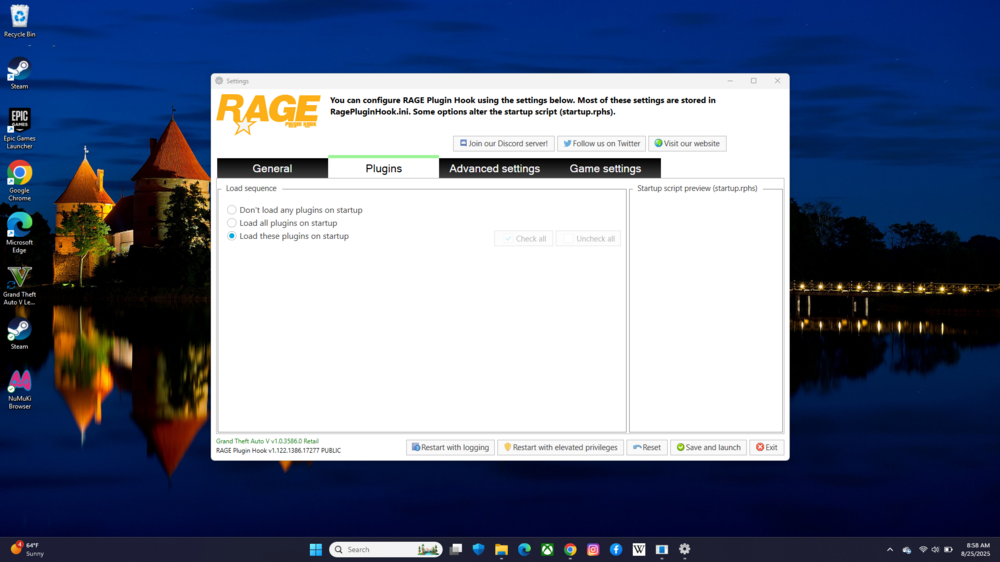
-
Sure, sorry it took so long for me to get back to you with an update. I'll be sure to provide soon
-
To whom it may concern, every time I play the new version of LSPDFR, RagePluginHook crashes every time I accept a call for a pursuit. It is frustrating beyond any words imaginable. To add insult to injury, when I tried to instrall RAGEPluginHook_1_122_pursuit_crashes_test.zip" to remedy the issue, it did not work. When I tried launching LSPDFR through RagePluginHook, it did not show LSPDFR as a plugin like it's supposed to, and whenever I open the game, it opens regularly with no "StoryMode with RagePlugin Hook" like it's supposed to. I could not find any video walkthroughs to help me solve this and I'm completely lost. If someone could please provide me guidance with this major inconvenience, it'd be greatly appreciated.
