



Theninguin0
Members
-
Joined
-
Last visited
Everything posted by Theninguin0
-
My game starts loading, then in the loading screen the game shuts down, without any message or error code. RagePluginHook.log
-
 Thanks! I would really appreciate if you'd leave a review.
 -
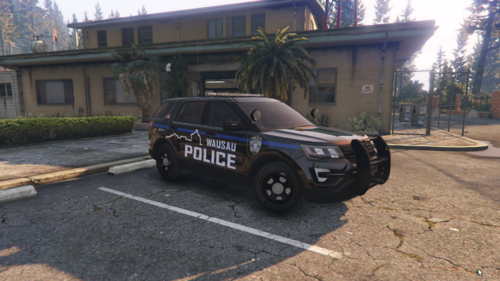
I made this texture because I stumbled upon their Youtube channel and I found it really interesting, also liked their cars, so I decided I'll make a texture to play with in my LSPDFR, and why not share it with everybody else who likes it. This pack includes textures for following vehicles: - 2020 FPIU - 2016 FPIU - 2018 Dodge Charger Tell me in the comments if you like it and what other vehicles would you like to see with this textures. I'm open to any suggestions! Credits: Upcoming update!! : - 2020 FPIU pics coming soon!!
-
It's ok I think, I tried once again and it didn't crash, so idk why did it crash the first time, I think because I was on the freeway and there were a lot of cars, other than that I don't have an explanation... but thanks anyway.
-
Well idk, it was the first time, then i haven't tried again
-
I was on a callout and I requested backup (using the UltimateBackup plugin), everything fine, then I requested EMT services and my game instalntly crashed. RagePluginHook.log


