Skip to content
View in the app

A better way to browse. Learn more.

LCPDFR.com

A full-screen app on your home screen with push notifications, badges and more.

To install this app on iOS and iPadOS
  1. Tap the Share icon in Safari
  2. Scroll the menu and tap Add to Home Screen.
  3. Tap Add in the top-right corner.
To install this app on Android
  1. Tap the 3-dot menu (⋮) in the top-right corner of the browser.
  2. Tap Add to Home screen or Install app.
  3. Confirm by tapping Install.

aay

Members
  • Joined

  • Last visited

Everything posted by aay

  1. aay replied to aay's topic in Legacy
    also i dont have a scripts folder could that be a problem?
  2. aay replied to aay's topic in Legacy
    I alr did this doesnt work im on a cracked version could that be the problem?
  3. aay replied to aay's topic in Legacy
    RagePluginHook_21042024_113432.log
  4. aay replied to aay's topic in Legacy
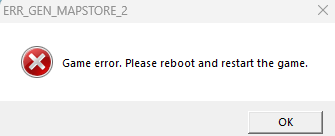
    now there is no err gen mapstore 2 but it still crashes as soon as i load the lspdfr plugin and when i reloadallplugins as soon as it reaches lspdfr it crashes
  5. aay replied to aay's topic in Legacy
    I tried making it load on startup but it made the startup crash too also i tried reloading all plugins then gta crashed im runing on an rtx 3060 with 16 gb ram is my pc the problem or what?
  6. aay posted a topic in Legacy
    The game loads fine but when i load the lspdfr plugin it crashes the game and gives me and error RagePluginHook_20042024_193448.log
Account

Navigation

Search

Search

Configure browser push notifications

Chrome (Android)
  1. Tap the lock icon next to the address bar.
  2. Tap Permissions → Notifications.
  3. Adjust your preference.
Chrome (Desktop)
  1. Click the padlock icon in the address bar.
  2. Select Site settings.
  3. Find Notifications and adjust your preference.