Skip to content
View in the app

A better way to browse. Learn more.

LCPDFR.com

A full-screen app on your home screen with push notifications, badges and more.

To install this app on iOS and iPadOS
  1. Tap the Share icon in Safari
  2. Scroll the menu and tap Add to Home Screen.
  3. Tap Add in the top-right corner.
To install this app on Android
  1. Tap the 3-dot menu (⋮) in the top-right corner of the browser.
  2. Tap Add to Home screen or Install app.
  3. Confirm by tapping Install.

Polishfrog

Members
  • Joined

  • Last visited

Everything posted by Polishfrog

  1. If I uninstall Yobbin Callouts, the game will be perfect, but this not good solution, becouse I want use Yobbin Callouts
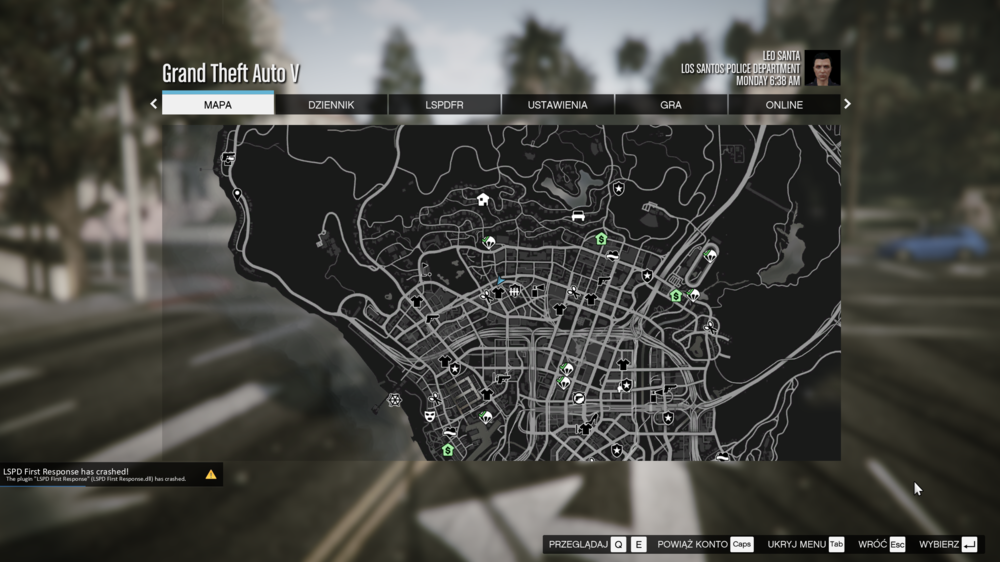
  2. Hi, I have problem. Always when I want open a map (ESC on keyboard) plugin has crashed like on image. I was try change a few value in lspdfr.ini like main.preloadAllModels and WorldEvents.MaxNumberOfEvents but this not repared the bug. Also, I was try reinstall plugin. In settings option Plugin timeout threshold I have set on 60000. Yesterday game working perfect but today I added Yobbin Callouts 1.7.1 and I don't know how fixed it RagePluginHook_10042024_161335.log
Account

Navigation

Search

Search

Configure browser push notifications

Chrome (Android)
  1. Tap the lock icon next to the address bar.
  2. Tap Permissions → Notifications.
  3. Adjust your preference.
Chrome (Desktop)
  1. Click the padlock icon in the address bar.
  2. Select Site settings.
  3. Find Notifications and adjust your preference.