TheBaconNation
Members
-
Joined
Everything posted by TheBaconNation
-
_svg.thumb.png.370d2fc9ae037635ba17bb789004c442.png) Includes the Canadian Criminal Code, Controlled Drugs and Substances Act, Ontario Highway Traffic Act, and Toronto Municipal Code (predominately for parking infractions). Both Charges.xml and Citations.xml are both purposefully void of any explicit reference to Canada, Ontario or Toronto if you hoped to have a lore-friendly version. All units described in Charges or Citations have been (unfortunately) converted to imperial to better match Los Santos, its speed signs, etc. Some charges and citations have also been shortened or simplified to better describe it the best of my ability. Some jargon like "conveyance" (a motor vehicle, a vessel, an aircraft or railway equipment) has been left in for authenticity. Jail sentences and fine amounts for Citations are based off actual guidelines.
Includes the Canadian Criminal Code, Controlled Drugs and Substances Act, Ontario Highway Traffic Act, and Toronto Municipal Code (predominately for parking infractions). Both Charges.xml and Citations.xml are both purposefully void of any explicit reference to Canada, Ontario or Toronto if you hoped to have a lore-friendly version. All units described in Charges or Citations have been (unfortunately) converted to imperial to better match Los Santos, its speed signs, etc. Some charges and citations have also been shortened or simplified to better describe it the best of my ability. Some jargon like "conveyance" (a motor vehicle, a vessel, an aircraft or railway equipment) has been left in for authenticity. Jail sentences and fine amounts for Citations are based off actual guidelines. -
 We are so back Love the direction this plugin has taken with the increased customization and the new damage system with armor. Also appreciate the healing fix!
- 633 comments
- 57 reviews
-
-

- 1
-
-
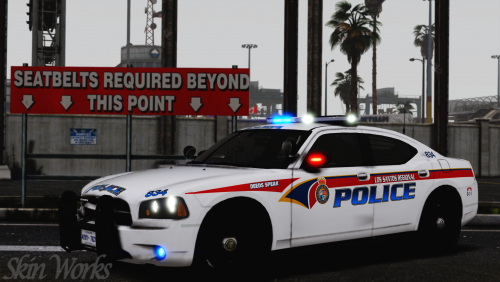
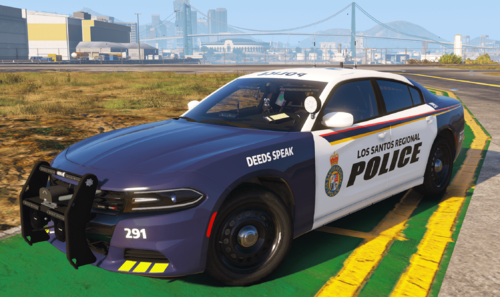 Made for the 2018 Dodge Charger v.1.0.1 in All of ЯΛBBIƬ GTA V Development's releases as of 11/25/2022. (Modification Universe, requires account creation and discord linked to account to download files). Modification Universe is no longer available. Also should theoretically work with Chargers using the same template (which are on the lcpdfr site), eg: Spoiler // Back with another livery with my 6 days of photoshop experience (including the two that it took me to make this one). This Lore-Friendly Livery is based on the new liveries for the York Regional Police cruiser fleet being rolled out, starting July 2023. The livery is based off a reference photo I harassed (emailed very politely) my local police department for. They provided one photo from the side of the cruiser and it felt a bit rude and pushy to ask them for more angles, so I just thanked them. Shouldn't be too different from the real thing (Update: the rear reflective chevrons are placed higher than the actual livery, they should span the row below the license plate. No incoming update to fix.) Thanks to Skin Works for permission to use their Lore-Friendly YRP Logo!
 -
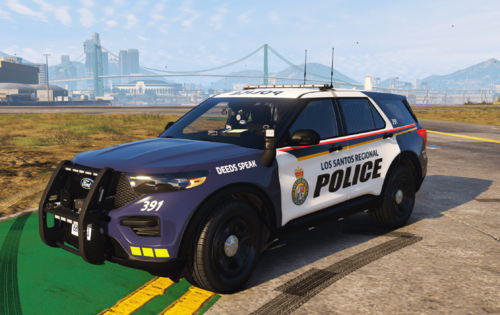 For the 21FPIU in // Saw someone on the lspdfr reddit with this livery that they made themselves for personal use. Got jealous. Opened up photoshop for the first time. Made my own. This Lore-Friendly Livery is based on the new liveries for the FPIU being rolled out by the York Regional Police, starting July 2023. Fair warning, I had zero prior photoshop/livery making experience prior to the 3 days I spent working on this (very noticeable if you open up the png), but I think it turned out pretty okay. Thought I'd share just in case the 1 or 2 people who live in this region and play lspdfr wanted this in their game, or if anyone else just happens to like the design. Thanks to Skin Works for permission to use their Lore-Friendly YRP Logo! Known Issues - The "Deeds Speak" on the front left side of the FPIU also causes itself to appear somewhat visible in the slit between the panels on the back right side. I believe this is a model issue and I don't believe there's anything I can do to get rid of this. It is at most slightly annoying.
 -
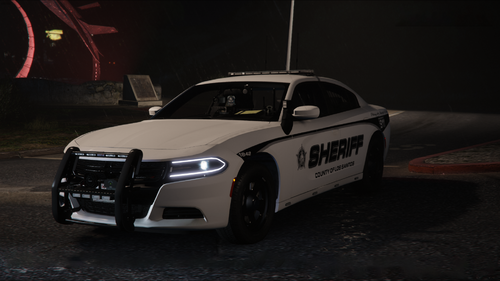 Beautiful pack. Some of the handling metas seems a bit absurd with the acceleration and top speed but was a quick fix.
- 90 comments
- 13 reviews
-
-

- 1
-
-
Make sure your dlclist is updated if you have a mods folder.
-
Go to GTA V/lspdfr/data and then edit the fullnames for the vehicles in duty_selection.xml.
-
-
I believe it should just be adding the weapon tags (Handguns, LongGuns, NonLethals and the tags within) to the StatePatrol section in the same format as you see in the LocalPatrol section, and then change whatever chance, weapons/components, etc. you want.
-

_svg.thumb.png.370d2fc9ae037635ba17bb789004c442.png)