


Meowtallica
Members
-
Joined
-
Last visited
Everything posted by Meowtallica
-
Most people usually REPLY with a final verdict to a solution they're given. I saw the react and didn't see a response so I assumed it didn't work. This was the only post with the solution you mentioned, although I was having similar issues it did not work for me. I decided to purchase the updated NVE file from Razed (only 5 bucks) and Reshade in the newly (updated beginning of April) released files, ReShade is STILL giving ELS, TrainerV, ETC. crash exception errors. I was finally told ReShade is separate from NVE and that the developer of ReShade within NVE files has not updated it. NVE optional add-ons still work without ReShade so i've decided I can deal without Volumetric Clouds + Vol. Headlights and removed the ReShade files.
-
This the reply solution ever work for you? Did this ever work?
-
.thumb.png.bf74695a2b4843e36a44b81635d6dbe7.png) I can't find any google pictures but I swear on my life I've seen Arab PD with an unmarked Chrysler 300C driving around. I think the last I saw it was when they were doing traffic control for the football field traffic over by the Waffle House. If you see it then maybe get a picture of it and do a vehicle template for it? Just an idea!
I can't find any google pictures but I swear on my life I've seen Arab PD with an unmarked Chrysler 300C driving around. I think the last I saw it was when they were doing traffic control for the football field traffic over by the Waffle House. If you see it then maybe get a picture of it and do a vehicle template for it? Just an idea! -
NIIICE! I went to Arab Electric Co-Op to pay my bill and came through Arab on my way home and passed by one of their Officers and then I see this! Small world! If I may suggest, Maybe add PD's Knight logo too?
-
 Thats what i was afraid of but I wanted to ask around and make sure I wasn't missing out on the potential for mouse use. I appreciate your info on this!
- 2,706 comments
- 241 reviews
-
-

- 1
-
-
I found that but im confused on how i would be able to use my mouse to click around on the ELS box interface. Any tips or pointers?
- 2,706 comments
- 241 reviews
-
@Lt.Caine Is there a way to enable and toggle the mouse cursor for different lighting selections or is it strictly just keybindings? I've got the box toggled on HUD but was wondering if there if a way to use the mouse button?
- 2,706 comments
- 241 reviews
-
BOOOOOOOOOOOOOOOO!!!!!!! 👎
-
Allllrighty! Got another question. I've got my Mic enabled for GrammarPolice and have no issues with it but I was wondering.... Is there a mod or maybe a setting in-game that will allow me to talk to AI Officers & Peds and also get responses? Kinda similar to using a mic to yell at the store clerk when you're robbing them? This question is for SP gameplay as well. I just want to try using my mic to give commands to AI Peds and talk with other Officers while getting responses back.
-
I added and removed so many goddamn files between NVE and GTA V that somewhere along the way I deleted something and haven't had a working game + LSPDFR all day so I am currently doing a fresh and clean install of GTA V and will try NVE once again with the above suggestions. I almost have half a mind to start screen recording the ending of the GTA V fresh install, installing RHP and all necessary components plugins with NO mods except NVE, play around in-game up until I get ELS.asi scripthook error and send the video to Razed and everybody who is pointing their finger at us. Such a great mod doesn't deserve such shitty developers who won't update and help fix these errors that THOUSANDS of people are having.
-
Honestly, I never went back to uninstall it because the ELS.asi and OpenInteriors.asi were two separate errors coming from the same thing, albeit I was more worried about the ELS... I have been searching high and low all freakin' day for an answer and I finally ended on Benzo's similar issue because he ultimately said it had something to do with NVE.ini and VolumetricClouds causing the issue while other people were claiming it was other files so it just got too complicated. I uninstalled NVE and everything that came with it and im gonna set it aside for a rainy day so i can try some other graphics mods. I truly truly truly appreciate you taking the time to try and help me resolve this. Of course, If you happen to come across a solution or have solutions then please reply with them so I can come back and look at them another time, assuming I go back and install it again.
-
How do I upload the ELS.asi? I'm not able to open or view it. IS it the ELS.ini? OH WAIT, you need this file? ELS.log
-
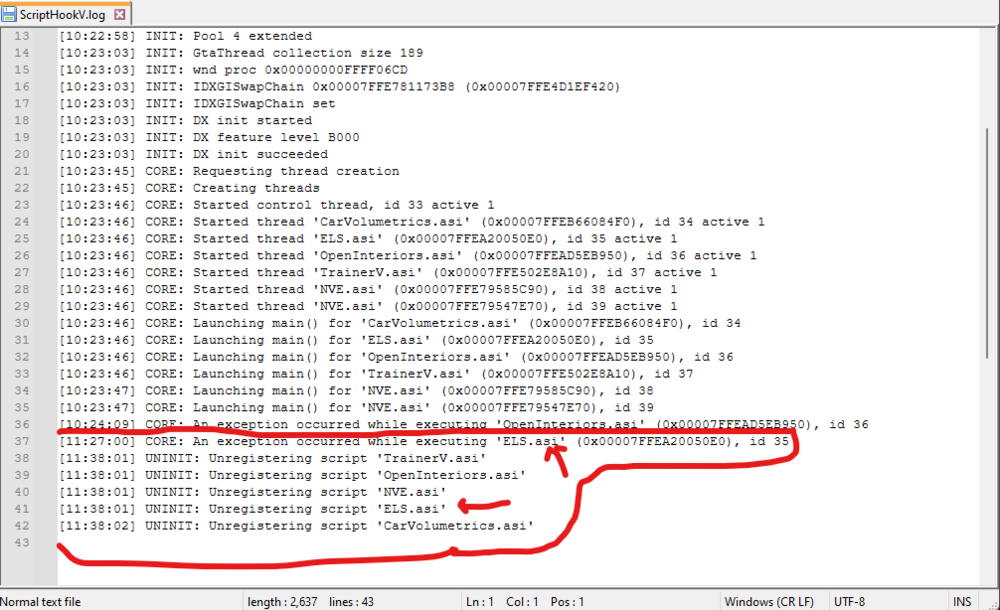
I can't remember where I think I saw it but eventually i'll come across it again! Thanks for the response to that! Next question I have is probably gonna stump you as well, but hopefully not. So, I downloaded the NVE Graphics Mod and didn't really go overboard with all the add-ons. Got it working and now I'm able to play SP. I was sitting in the patrol car when all of a sudden I got an error code from ScriptHook about the ELS, which I've never had the problem before. I'm not too worried about the OpenInteriors error, although I would like to maybe fix it if I can fix the ELS. What should I do to prevent the ELS.asi file from throwing an error? It eventually gave me an exception but when I got back into the game I couldn't use my lights. The car mods are correctly installed and placed into the appropriate areas within OpenIV because i've been using them the last few days and a little while this morning with NVE. What do you suggest? EDIT** Also, I deleted the LML and Modmanager along with the files that came with it and one of them happen to be vcf.dll out of the GTA V main directory. Should i retrieve that file back?
-
Oh, Sorry! I thought you were the creator of LML since your name is Lennyy. Got another question though... is there a mod / setting config that I can add or change to have backup partner automatically spawn when I initiate a traffic stop? Recently installed the CallOutInterface plugin and I enabled AutoTrafficStop Callout to be set where dispatch calls out my traffic stop but I was wondering if there is a way that when the callout is automatically sent then I can have AI backup respond behind me automatically instead of having to use a keybind (or interface menu) to call for one? I did also enable OfferBackupTrafficStop so dispatch will ask if I want it, but Im just trying to eliminate my own confusion trying to remember all the keybindings and sitting at a traffic stop for 10 minutes finding keybindings before I even step foot outside the vehicle I hope my question makes sense.... Im still learning as i go
-
Is there a mod / setting config that I can add or change to have backup partner automatically spawn when I initiate a traffic stop? Recently installed the CallOutInterface plugin and I enabled AutoTrafficStop Callout to be set where dispatch calls out my traffic stop but I was wondering if there is a way that when the callout is automatically sent then I can have AI backup respond behind me automatically instead of having to use a keybind (or interface menu) to call for one? I did also enable OfferBackupTrafficStop so dispatch will ask if I want it, but Im just trying to eliminate my own confusion trying to remember all the keybindings and sitting at a traffic stop for 10 minutes finding keybindings before I even step foot outside the vehicle I hope my question makes sense.... Im still new to this game and learning as I go.
-
Coming in clutch once again! Thank you, Lenny! (Btw, the LML is such a lifesaver! ❤️ )
-
Got another question! What mod / plugin is this to get this sort of overlay?
.png.5d7a72c84fe4cfa15998304bc2681527.png)
-
THANK YOU SO MUCH! I've seen the LML download but never knew what it was but that helps tremendously about the FiveM conversion to SP, which SP is what i've been doing at the moment. I will definitely check out 5mods too! some of the ones i've seen were updated around 21-22 but was afraid to use them since they might be outdated. Thank you again for the helpful response!
-
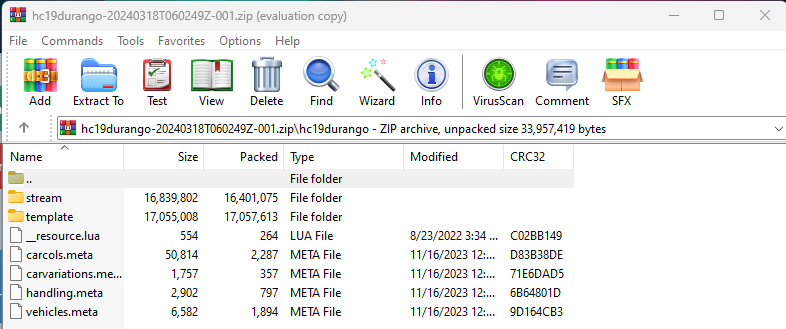
I'm sure this gets asked quite often but I am new to the LSPDFR community and I have a few questions that I'm not able to find online. 1)I've navigated to GTA V/Mods in OpenIV but from there Im lost on where to add these files. Stream Folder has the YFT / YTD files for the vehicle. (Might be non-ELS since I don't see an XML file) 2) all the folders in GTAV/Mods/update/x64/dlcpacks (like patchday folders) how do I know where certain vehicle mods go with these folders. (I.E. I downloaded the BCSO sheriff pack and they all went in Patchday3 but why? How do i know which folder mods go in which?) 3) Is there a way to add more destruction physics to our vehicles that lets our cars show more cosmetic damage? Like, maybe a string of code or something where I change the number to a greater value? (not sure how to word that) I haven't seen any recent plugins or mods that would allow for more realistic destruction for player-driven-vehicles. I appreciate any help or information I can get! I'm learning the ropes as I go and Im slowly getting the hang of adding plugins (grammarpolice, Prowler Radar, etc) to the game!

.thumb.png.bf74695a2b4843e36a44b81635d6dbe7.png)

.png.5d7a72c84fe4cfa15998304bc2681527.png)
