Officer M Becker
Members
-
Joined
-
Last visited
Everything posted by Officer M Becker
-
But not solved as expected... sry Got the solution... it was due to McAfee
-
I did it but RagePluginHook is still simply removed
-
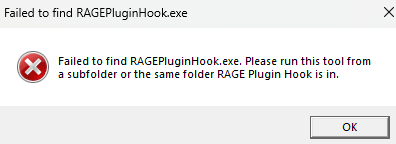
How do I do this for the RagePluginHook.exe if it always automatically removes it from the folder? Because if I have the RagePluginHook.exe in my browser outside the .zip file from the website then the RPH.exe is immediately gone
-
Thanks for the answer... the only thing is that it is exactly the same there... I have already tried it... are there any other suggestions? RagePluginHook.exe is automatically removed from my folder... what can I do?
-
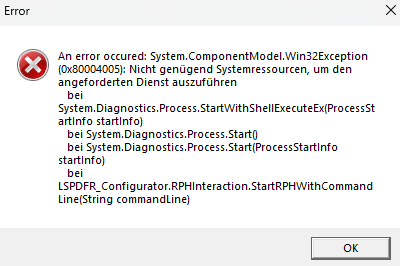
I want to reinstall LSPDFR and now I have the following problem as you can see in the picture... what can I do? I would very much like to play LSPDFR again but apparently it is not possible because of the RagePluginHook and system resources So what can I do? Sorry if I put it in the wrong topic. Best regards Officer M Becker