Skip to content
View in the app

A better way to browse. Learn more.

LCPDFR.com

A full-screen app on your home screen with push notifications, badges and more.

To install this app on iOS and iPadOS
  1. Tap the Share icon in Safari
  2. Scroll the menu and tap Add to Home Screen.
  3. Tap Add in the top-right corner.
To install this app on Android
  1. Tap the 3-dot menu (⋮) in the top-right corner of the browser.
  2. Tap Add to Home screen or Install app.
  3. Confirm by tapping Install.

shreyaz

Members
  • Joined

  • Last visited

Everything posted by shreyaz

  1. so, what is "callbyaddress"?
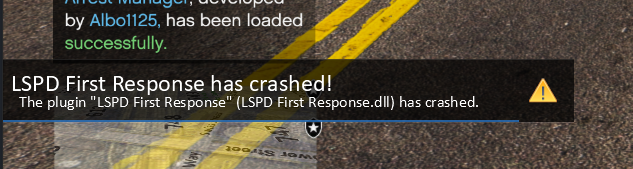
  2. Hello, I typed the RPH command 'ForceDuty,' and then I pressed 'F8.' After that, I got a crash related to the LSPD First Response.dll. Is this a rare crash RagePluginHook_30112024_024638.log
  3. shreyaz replied to shreyaz's topic in Legacy
    Fixed. I investigated and found out that the plugin was outdated, I deleted it, I was able to fix it
  4. shreyaz replied to shreyaz's topic in Legacy
    Bump
  5. shreyaz replied to shreyaz's topic in Legacy
    Bump
  6. shreyaz posted a topic in Legacy
    I don't understand why this error occurs, can anyone help? Also here is launcher log: launcher.01.log
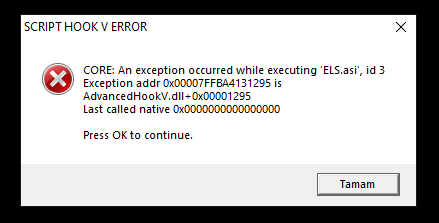
  7. Fixed. I reinstalled AdvancedHookV.
  8. I don't understand why this problem is occurring, can anyone help me fix it? I installed a car with ELS and it works (lights, etc. don't work, it just works from driving the car) but I set up an ELS system and it shows that it gives an error The ELS system is giving me an error The one I installed with car els
Account

Navigation

Search

Search

Configure browser push notifications

Chrome (Android)
  1. Tap the lock icon next to the address bar.
  2. Tap Permissions → Notifications.
  3. Adjust your preference.
Chrome (Desktop)
  1. Click the padlock icon in the address bar.
  2. Select Site settings.
  3. Find Notifications and adjust your preference.
