Skip to content
View in the app

A better way to browse. Learn more.

LCPDFR.com

A full-screen app on your home screen with push notifications, badges and more.

To install this app on iOS and iPadOS
  1. Tap the Share icon in Safari
  2. Scroll the menu and tap Add to Home Screen.
  3. Tap Add in the top-right corner.
To install this app on Android
  1. Tap the 3-dot menu (⋮) in the top-right corner of the browser.
  2. Tap Add to Home screen or Install app.
  3. Confirm by tapping Install.

MasterChief.124

Members
  • Joined

  • Last visited

Everything posted by MasterChief.124

  1. I had to reinstall everything. I had the same issue a few days ago. There is an update to LSPDFR, ScriptHookV. It's a pain but its the price we pay to play what we like. Also, I had issues with the "RageNativeUI.dll" I maintained the one from "StopThePed". Don't forget to open OpenIV to install the ASI tool.
  2. Seeing how I have been playing the game for what 2 to 3 months straight with no problems. I saw this banner. Alternatively, I thought it was another issue that had arisen.....smh(LOL) Yeah, that is exactly what I did. I had a backup copy of my mods and configs. Thanks bro!
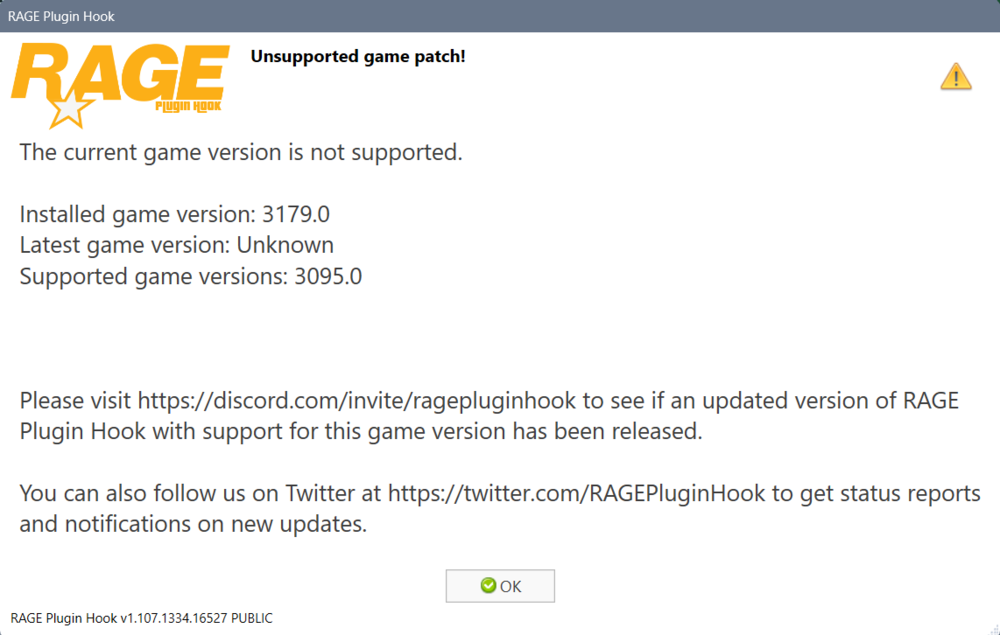
  3. Last night I was just playing the GTA V (LSPDFR). Today, I come in and tried to start the game up and I see this message: What can I do to correct the issue?
Account

Navigation

Search

Search

Configure browser push notifications

Chrome (Android)
  1. Tap the lock icon next to the address bar.
  2. Tap Permissions → Notifications.
  3. Adjust your preference.
Chrome (Desktop)
  1. Click the padlock icon in the address bar.
  2. Select Site settings.
  3. Find Notifications and adjust your preference.