12313212312313
Members
-
Joined
-
Last visited
Everything posted by 12313212312313
-
-
-
-
-
-
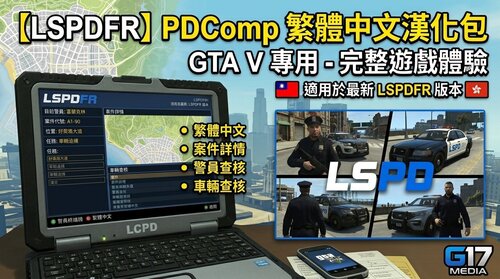 🇹🇼【LSPDFR】PDComp 繁體中文漢化包歡迎使用 PDComp 繁體中文漢化包! 本漢化包專為 PDComp 製作,將 PDComp 支援的介面、提示訊息、通知以及相關文字內容翻譯為繁體中文,讓台灣玩家能夠更加輕鬆地使用 PDComp。 📦 漢化包內容本漢化包包含 PDComp 所需的繁體中文翻譯文件。 PDComp_繁體中文漢化包 │ ├── PDComp 漢化文件 ├── 其他必要文件 └── readme.txt 🇹🇼 漢化內容本漢化包主要翻譯 PDComp 中的相關文字,包括: 🖥️ PDComp 介面 📢 系統提示 🚔 警察相關資訊 👤 人員/嫌疑人資訊 🚗 車輛資訊 🔎 搜尋相關文字 📝 資料庫與其他支援的文字內容 翻譯以繁體中文為主,並盡可能使用符合台灣玩家習慣的用語。 ⚠️ 使用需求使用本漢化包前,請確認你已經安裝: PDComp 本體 LSPDFR 正常運作的 GTA V 🛠️ 安裝方式① 先安裝 PDComp請先完成 PDComp 本體的安裝。 進入 GTA V 後確認 PDComp 可以正常運作,再進行漢化包安裝。 ② 找到 GTA V 主目錄找到你的 GTA V 安裝位置。 例如: C:\Program Files\Rockstar Games\Grand Theft Auto V\ 或 Steam / Epic Games 所使用的 GTA V 安裝資料夾。 重點是找到包含 GTA5.exe 的主目錄。 ③ 將漢化文件拖入 GTA V 主目錄將本漢化包內的所有文件與資料夾直接拖曳到: GTA V\ 也就是與: GTA5.exe PlayGTAV.exe 位於同一層的 GTA V 主目錄。 如果 Windows 跳出: 請選擇: 取代檔案 📁 正確安裝位置安裝完成後,漢化文件應該位於 GTA V 主目錄內。 例如: Grand Theft Auto V │ ├── GTA5.exe ├── PlayGTAV.exe ├── dinput8.dll ├── ScriptHookV.dll ├── ... │ └── PDComp 相關漢化文件 🔄 如何移除漢化?如果想恢復原本的英文內容,請刪除本漢化包所安裝的文件,並重新放回 PDComp 原始文件。 如果漢化包有提供備份文件,建議在安裝前先保留原始文件。 ⚠️ 更新 PDComp如果你更新了 PDComp: 先確認新版 PDComp 可以正常運作。 確認新版 PDComp 與本漢化包相容。 如果英文重新出現,重新安裝最新版本的漢化包。 ❓ 常見問題Q:需要 PDComp 嗎?需要。 本漢化包是 PDComp 的繁體中文漢化,不是獨立插件。 Q:漢化包包含 PDComp 本體嗎?不包含。 請先自行安裝 PDComp。 Q:要用 OpenIV 安裝嗎?不用。 本漢化包採用直接拖入 GTA V 主目錄的方式安裝。 Q:要放在哪裡?放在包含 GTA5.exe 的 GTA V 主目錄。 Q:可以放到 mods 資料夾嗎?不建議。 本漢化包的安裝方式是直接放入 GTA V 主目錄,請依照本說明安裝。 Q:可以跟其他 LSPDFR 插件一起使用嗎?可以。 只要其他插件與 PDComp 沒有發生檔案衝突,通常可以正常一起使用。 📌 注意事項⚠️ 必須先安裝 PDComp 本體 📁 漢化文件直接放入 GTA V 主目錄 🎮 GTA V 主目錄就是包含 GTA5.exe 的資料夾 🔄 更新 PDComp 後可能需要重新安裝漢化包 ❌ 不要將漢化包整個資料夾直接塞進 GTA V ❌ 不需要使用 OpenIV Package Installer 🇹🇼 本漢化包為繁體中文翻譯 🇹🇼 PDComp 繁體中文漢化讓 PDComp 的使用更加簡單、直覺。 本漢化包將 PDComp 中支援的英文內容翻譯為繁體中文,讓台灣玩家能夠更容易理解遊戲中的警察資訊、提示與相關功能。 🚔 享受繁體中文的 LSPDFR 執法體驗! PDComp 繁體中文漢化包 版本:v1.0.0
 -
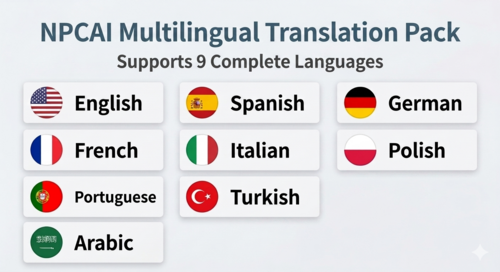 🌍 [LSPDFR AI] NPCAI Localization PackWelcome to the official presentation page for the NPCAI Localization Pack. The NPCAI Localization Pack is an optional language expansion for NPCAI, designed to provide a more immersive experience for players who want NPCAI interactions and related dialogue to appear in their preferred language. 📦 Package ContentsThe v1.0.0 distribution includes nine language packages that can be installed through OpenIV's .oiv Package Installer. NPCAI_Localization_v1.0.0 │ ├── Mod.png ├── NPCI_Arabic_languages.zip ├── NPCI_English_languages.zip ├── NPCI_French_languages.zip ├── NPCI_German_languages.zip ├── NPCI_Italian_languages.zip ├── NPCI_Polish_languages.zip ├── NPCI_Portuguese_languages.zip ├── NPCI_Spanish_languages.zip ├── NPCI_Turkish_languages.zip ├── NPCI_Chinese_languages.zip └── readme.txt 🌐 Supported LanguagesThe following nine languages are currently available: 🇬🇧 English 🇫🇷 French 🇩🇪 German 🇪🇸 Spanish 🇮🇹 Italian 🇵🇱 Polish 🇵🇹 Portuguese 🇹🇷 Turkish 🇸🇦 Arabic 🇹🇼 Taiwan Each language is provided as a separate .zip installation package. ⚠️ RequirementsBefore installing the Localization Pack, make sure you have: NPCAI installed and working correctly. OpenIV installed. A compatible GTA V / LSPDFR installation. Sufficient access to your GTA V mods folder. ImportantNPCAI is mandatory. The Localization Pack only provides language-specific localization files for NPCAI. It does not include the NPCAI plugin itself. If NPCAI is not installed, installing this package alone will not provide NPC AI functionality. 🛠️ Installation GuideStep 1 — Install NPCAIFirst, install the original NPCAI plugin and make sure it works correctly before installing any localization package. If NPCAI is not working properly, resolve the NPCAI installation first. Step 2 — Choose your languages🇬🇧 English 🇫🇷 French 🇩🇪 German 🇪🇸 Spanish 🇮🇹 Italian 🇵🇱 Polish 🇵🇹 Portuguese 🇹🇷 Turkish 🇸🇦 Arabic 🇹🇼 Taiwan Step 3 — Drog to your NPCI FolderDrog to your NPCI FolderD:\SteamLibrary\steamapps\common\Grand Theft Auto V\plugins\LSPDFR\NPCI Done !⚠️ Important — Install Only One LanguagePlease install only one language package at a time. Installing multiple NPCAI language packages may cause files to be overwritten or result in an unexpected language configuration. 🔧 CustomizationAdditional configuration and customization information can be found in the included: readme.txt Please read the documentation before manually modifying any localization files. 📌 Frequently Asked QuestionsIs NPCAI required?Yes. This is a localization expansion for NPCAI and is not a standalone plugin. Does this package include NPCAI?No. You must download and install NPCAI separately. Can I install all nine languages?No. Only install the language you intend to use. Does this change the entire GTA V language?No. The Localization Pack is intended specifically for NPCAI-related localization and does not translate GTA V as a whole. Can I switch languages later?Yes. Remove or replace the current NPCAI localization files and install the desired language package.
 -
-
-
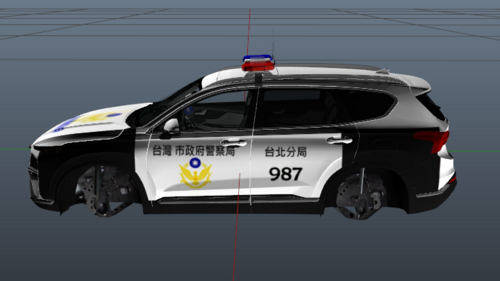 這是我第一次做塗裝 應該還不錯 致謝:paulchopping1986 原廠車檔:Tasmania Transport Inspector Fortuner 連結: Toyota Fortuner 安裝:Grand Theft Auto V\mods\update\x64\dlcpacks\gd7\dlc.rpf\x64\levels\gta5\vehicles\vehicles.rpf\x64\levels\gta5\vehicles\vehicles.rpf\
 -
-
-
My LSPDFR kept crashing so I needed a clean handling.meta and vehicle.meta