


phishyblue
Members
-
Joined
-
Last visited
Everything posted by phishyblue
-
 An absolute must if you have lots of plugins running on LSPDFR. How many times have you tried typing a suspect's name into the computer only to have your radio pop up and you start digging through the trunk of your squad for whatever reason . . . frustrating! LSPDFR Computer+ doesn't have this same issue and you don't even need to remember the suspect's name anymore, it will automatically be loaded into the computer and added to recent search history. HUGE immersion detail here, especially if you like the RP experience and you want to attach suspect(s) / Vehicles to an ICR. I absolutely love this mod and I recommend it to anyone who is looking for more immersion or has problems with other plugins trying to run while doing ped/vehicle lookups.
- 1,742 comments
- 172 reviews
-
-

- 2
-
-
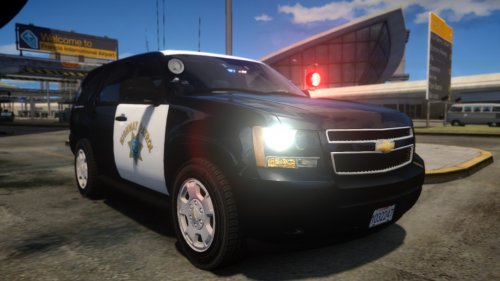 This is the best Tahoe model I've ever seen. Every other model has had something slightly off in the front end, with errors in the headlights or the windshield. This one is perfect. Looks exactly like the vehicle it's supposed to represent. This has become my absolute favorite vehicle to use in-game. Thanks BErad1502!
- 8 comments
- 12 reviews
-
-
- 1
-
