


SparhawkTB
Members
-
Joined
-
Last visited
Everything posted by SparhawkTB
-
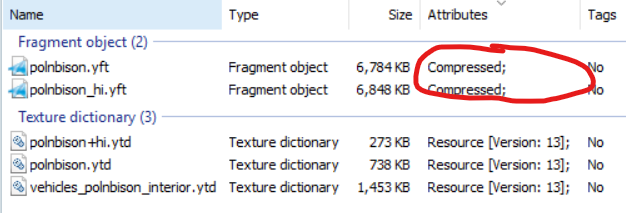
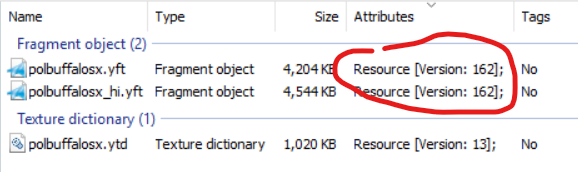
I am having trouble with some mods I am converting from FiveM to SP. The attributes for the .yft files are labeled as "Compressed" instead of "Resources [Version: XX]". This is causing my game to crash when I try to spawn the modded vehicle with the problem files. Is there a way to change the attributes of the files? What the .yft files are supposed to look like: The Problem File:
-
I just downloaded GTA IV on the device I am currently playing on and when I load into the apartment I can only see some items from the apartment but other than that nothing else is loading. I have played GTA 4 without issue on this device a few months ago. But now nothing is rendering. I already tried reinstalling the game and the commandline.txt fix. Neither worked.
-
Something inside the LSPDFR plugin is causing my game to crash, but I cannot Decipher the message. RagePluginHook.log
-
.thumb.png.9020afbe2c679e068040fb6472cd8611.png) Just asking, will there be a version of this mod that does not rely on a siren controller mod?
Just asking, will there be a version of this mod that does not rely on a siren controller mod? -
Is there a DLS XML file for the car?
-
It looks like the way the lighting was changed for the Chop shop update, I just used the original visualsettings.dat.
-
I am using better radiance but it does not affect the police lights on the police cars from the Chop Shop DLC. Does anyone know a mod that brightens the police lights from the Chop Shop DLC?
-
I got it fixed! 2 mods were interfering with the vehicles! 1. Monkeypolice188's Los Santos fire department pack (causing the red light problem) 2. Jacobmaate's Lore Friendly Lenco Bearcat: Brute Centurion
-
No, I haven't had ELS on this install of GTA5
-
I was trying to do a K9 run of LSPDFR but I tried to pull over somebody and I tried to have my K9 Sniff the vehicle but the prompt "Press to speak to the Passenger keeps getting in the way of the UB K9 prompt making the Dog unable to sniff the vehicle. Grand Theft Auto V 2024-05-12 08-52-56 (1).mp4
-
I am having three separate issues with my Emergency lights on non-els vehicles. 1. The emergency lights turn all red instead of red and blue (Police Bike Video) 2. most of the lights on some police vehicles do not flash (Sheriff Alamo Video) 3. Some of the lights disappear and some grow oversized and outside of the vehicle (Sheriff Granger Video) https://youtu.be/ITBA6Yxta7A(Police Bike) https://youtu.be/nDuz6H93oAI(police Alamo) https://youtu.be/HUQpCi1DbvE (Sheriff Granger)
-
I have replacer mods on GTA but all of a sudden they stopped working. I have a bunch of Firearm Replacer mods but now they all have reverted back to vanilla weapons. Had anyone else had this problem and is there a way to fix it?
-
Thanks, it worked did you find this in the .log I provided or was this a common problem?
-
My lspdfr plugin crashed, can i please have help interpreting this file and possible solutions please?RagePluginHook.log
-
Go to Grand Theft Auto V\plugins\EUP and open settings.ini then set SkipInstallCheck and SkipDLCCheck to true. That might help but I'm not really sure. From what I know it should technically prevent the plugin from checking the dlc files.
-
It works now! Thank you so much!
-
RagePluginHook.log
-
Hello, Recently I have downloaded the fire callouts mod and whenever I activate the fire callouts menu my game crashes. Can anyone tell me how to fix this?

.thumb.png.9020afbe2c679e068040fb6472cd8611.png)
