Skip to content
View in the app

A better way to browse. Learn more.

LCPDFR.com

A full-screen app on your home screen with push notifications, badges and more.

To install this app on iOS and iPadOS
  1. Tap the Share icon in Safari
  2. Scroll the menu and tap Add to Home Screen.
  3. Tap Add in the top-right corner.
To install this app on Android
  1. Tap the 3-dot menu (⋮) in the top-right corner of the browser.
  2. Tap Add to Home screen or Install app.
  3. Confirm by tapping Install.

rwn700

Members
  • Joined

  • Last visited

Everything posted by rwn700

  1. the problem comes from super callout it's fixed thanks
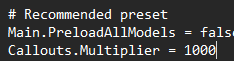
  2. Can anyone help me please, I installed 5 or 6 packs callouts but I get few callouts or sometimes for 10 minutes nothing, and manually the callouts work I had to use Google Translate. I don't speak English, sorry if it's not understandable. I put even 1000 but nothing happens I receive 1 every 10 minutes
  3. rwn700 replied to LAN9256's topic in Legacy
    soit vous supprimez menyoo, soit vous mettez à jour le script hook v, this is what worked for me
  4. the game was working fine yesterday, I fell asleep and I just launched lspdfr and hop it gives me this message and lspdfr crashes , I need help but everything worked fine yesterday and I'm up to date ! RagePluginHook.log

Account

Navigation

Search

Search

Configure browser push notifications

Chrome (Android)
  1. Tap the lock icon next to the address bar.
  2. Tap Permissions → Notifications.
  3. Adjust your preference.
Chrome (Desktop)
  1. Click the padlock icon in the address bar.
  2. Select Site settings.
  3. Find Notifications and adjust your preference.