Skip to content
View in the app

A better way to browse. Learn more.

LCPDFR.com

A full-screen app on your home screen with push notifications, badges and more.

To install this app on iOS and iPadOS
  1. Tap the Share icon in Safari
  2. Scroll the menu and tap Add to Home Screen.
  3. Tap Add in the top-right corner.
To install this app on Android
  1. Tap the 3-dot menu (⋮) in the top-right corner of the browser.
  2. Tap Add to Home screen or Install app.
  3. Confirm by tapping Install.
Due to overzealous filtering on Microsoft’s side, some emails to Outlook and Hotmail addresses may not be delivered. If you’re affected, please use a different email address or try again later.

SimoSimo20

Members
  • Joined

  • Last visited

Everything posted by SimoSimo20

  1. Hi Quick question — any chance you could add Gemini API support as an option? Right now I'm limited on the providers available and Gemini's free tier would make it way easier for people to run. Also just curious how the mod's going on your end — any new features planned? Keep up the great work, really appreciate it.
  2. After 10 to 15 minutes RPH crashes after going on duty RagePluginHook.log
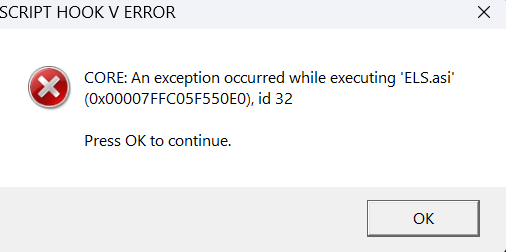
  3. The Game Runs Fine the only problem is ELS
Account

Navigation

Search

Search

Configure browser push notifications

Chrome (Android)
  1. Tap the lock icon next to the address bar.
  2. Tap Permissions → Notifications.
  3. Adjust your preference.
Chrome (Desktop)
  1. Click the padlock icon in the address bar.
  2. Select Site settings.
  3. Find Notifications and adjust your preference.