
qWeR1111
Members
-
Joined
-
Last visited
Everything posted by qWeR1111
-
Latest log: 2024-11-02 오전 2:09:16.435] Started new log on 2024-11-02 오전 2:09:16.435 [2024-11-02 오전 2:09:16.437] ==================================================================================================== [2024-11-02 오전 2:09:16.433] Log path: E:\SteamLibrary\steamapps\common\Grand Theft Auto V\RagePluginHook.log [2024-11-02 오전 2:09:16.437] Log verbosity: Trivial [2024-11-02 오전 2:09:16.440] Initializing input system [2024-11-02 오전 2:09:16.440] AppDomainPool::InitializeAppDomain: Creating new app domain "PreInitializedDomain_0". [2024-11-02 오전 2:09:16.441] AppDomainPool::InitializeAppDomain: Creating new app domain "PreInitializedDomain_3". [2024-11-02 오전 2:09:16.441] AppDomainPool::InitializeAppDomain: Creating new app domain "PreInitializedDomain_1". [2024-11-02 오전 2:09:16.442] AppDomainPool::InitializeAppDomain: Creating new app domain "PreInitializedDomain_2". [2024-11-02 오전 2:09:16.442] Initializing game console [2024-11-02 오전 2:09:16.449] Console key has been set to F4 (key code: 115) [2024-11-02 오전 2:09:16.575] Initializing console variable "ConsoleScrollAmount". [2024-11-02 오전 2:09:16.575] Type: System.Int32, Reading section: "Miscellaneous", key: ConsoleScrollAmount [2024-11-02 오전 2:09:16.577] Read value: <null> [2024-11-02 오전 2:09:16.577] Initializing console variable "ConsoleKey". [2024-11-02 오전 2:09:16.577] Type: System.Windows.Forms.Keys, Reading section: "Miscellaneous", key: ConsoleKey [2024-11-02 오전 2:09:16.578] Read value: <null> [2024-11-02 오전 2:09:16.578] Initializing console variable "PluginTimeoutThreshold". [2024-11-02 오전 2:09:16.578] Type: System.Int32, Reading section: "Miscellaneous", key: PluginTimeoutThreshold [2024-11-02 오전 2:09:16.580] Read value: 10000 [2024-11-02 오전 2:09:16.580] Setting value of console variable "PluginTimeoutThreshold" to stored value. [2024-11-02 오전 2:09:16.580] Initializing console variable "AlwaysShowConsoleOutput". [2024-11-02 오전 2:09:16.580] Type: System.Boolean, Reading section: "Miscellaneous", key: AlwaysShowConsoleOutput [2024-11-02 오전 2:09:16.580] Read value: <null> [2024-11-02 오전 2:09:16.580] Initializing console variable "ShowConsoleCommandInfoOnPluginLoad". [2024-11-02 오전 2:09:16.580] Type: System.Boolean, Reading section: "Miscellaneous", key: ShowConsoleCommandInfoOnPluginLoad [2024-11-02 오전 2:09:16.581] Read value: <null> [2024-11-02 오전 2:09:16.581] Initializing console variable "ShowOnScreenWarnings". [2024-11-02 오전 2:09:16.581] Type: System.Boolean, Reading section: "Miscellaneous", key: ShowOnScreenWarnings [2024-11-02 오전 2:09:16.581] Read value: <null> [2024-11-02 오전 2:09:16.581] Console initialized [2024-11-02 오전 2:09:16.581] Initializing forms manager [2024-11-02 오전 2:09:16.582] Cleaning temp folder [2024-11-02 오전 2:09:16.584] Version: RAGE Plugin Hook v1.115.1348.16655 for Grand Theft Auto V [2024-11-02 오전 2:09:16.617] ================ RAGE Plugin Hook ================ [11/2/2024 2:09:16 AM.623] Detected Windows 10 Professional (64-bit) (10.0.19045.0)! [11/2/2024 2:09:16 AM.624] Checking game support [11/2/2024 2:09:16 AM.884] Product name: Grand Theft Auto V [11/2/2024 2:09:16 AM.884] Product version: 1.0.3351.0 [11/2/2024 2:09:16 AM.884] Is steam version: True [11/2/2024 2:09:16 AM.886] Initializing DirectX [11/2/2024 2:09:16 AM.888] Initializing Direct3D [11/2/2024 2:09:16 AM.888] Getting game swap chain [11/2/2024 2:09:16 AM.940] Swap Chain created: 0x7FF6F8AE01F0 [11/2/2024 2:09:16 AM.940] Swap Chain VTable: 0x29B8A8ED260 [11/2/2024 2:09:16 AM.940] 0x748948000FF085E9;0x8D48564157552024;0x170EC814890246C [11/2/2024 2:09:16 AM.940] D3D11Present: 0x7FFB870C18C0 [11/2/2024 2:09:16 AM.940] D3D11ResizeBuffers: 0x7FFB870E2810 [11/2/2024 2:09:16 AM.940] D3D11ResizeTarget: 0x7FFB8712C460 [11/2/2024 2:09:16 AM.940] D3D11SetFullscreenState: 0x7FFB870E1F30 [11/2/2024 2:09:16 AM.940] Direct3D initialized [11/2/2024 2:09:16 AM.940] Initialized DirectX [11/2/2024 2:09:17 AM.288] Direct3D watcher thread spawned [11/2/2024 2:09:17 AM.290] Getting device [11/2/2024 2:09:17 AM.290] Retrieved device [11/2/2024 2:09:17 AM.290] Creating wrapper [11/2/2024 2:09:17 AM.379] Wrapper created [11/2/2024 2:09:17 AM.393] Effect created [11/2/2024 2:09:17 AM.393] Creating buffer [11/2/2024 2:09:17 AM.393] Created buffer [11/2/2024 2:09:17 AM.393] Creating blend state [11/2/2024 2:09:17 AM.393] Created blend state [11/2/2024 2:09:17 AM.393] Done with creation [11/2/2024 2:09:17 AM.437] Initializing texture system. [11/2/2024 2:09:17 AM.437] Initializing texture system; phase 1 [11/2/2024 2:09:17 AM.437] Initializing texture system; phase 2 [11/2/2024 2:09:17 AM.446] Initializing texture system; phase 3 [11/2/2024 2:09:17 AM.446] Initializing texture system; phase 4 [11/2/2024 2:09:17 AM.463] Initializing texture system; phase 5 [11/2/2024 2:09:17 AM.464] Initializing texture system; phase 6 [11/2/2024 2:09:17 AM.468] Initializing texture system; phase 7 [11/2/2024 2:09:17 AM.470] Initializing texture system; phase 8 [11/2/2024 2:09:17 AM.471] Initializing texture system; phase 9 [11/2/2024 2:09:17 AM.472] Initializing texture system; phase 10 [11/2/2024 2:09:17 AM.476] Initializing texture system; phase 11 [11/2/2024 2:09:17 AM.476] Initializing texture system; phase 12 [11/2/2024 2:09:17 AM.478] Initializing texture system; phase 13 [11/2/2024 2:09:17 AM.478] Initializing texture system; phase 14 [11/2/2024 2:09:17 AM.797] Direct3D watcher thread ended [11/2/2024 2:10:06 AM.535] LoadingScreenMsg: Initializing game support [11/2/2024 2:10:06 AM.786] Initializing game support [11/2/2024 2:10:08 AM.020] LoadingScreenMsg: Velocity limit removed [11/2/2024 2:10:08 AM.407] Compatibility level: 0 [11/2/2024 2:10:08 AM.407] Supported version detected [11/2/2024 2:10:08 AM.407] ================================================== [11/2/2024 2:10:08 AM.407] LoadingScreenMsg: Patching code [11/2/2024 2:10:08 AM.660] LoadingScreenMsg: Waiting for game initialization [11/2/2024 2:10:08 AM.915] Waiting for game initialization [11/2/2024 2:10:09 AM.028] LoadingScreenMsg: Initializing core [11/2/2024 2:10:09 AM.317] Initializing hook [11/2/2024 2:10:09 AM.334] LoadingScreenMsg: Completing interoperability [11/2/2024 2:10:09 AM.585] Completing interoperability [11/2/2024 2:10:09 AM.585] Initialization code 1. [11/2/2024 2:10:09 AM.585] Initialization code 2. [11/2/2024 2:10:09 AM.585] Initialization code 3. [11/2/2024 2:10:09 AM.592] 1 Address: 0x00007FF6F67F10A8 [11/2/2024 2:10:09 AM.592] Calling func 1 [11/2/2024 2:10:09 AM.608] 2 Address: 0x00007FF6F73F35A6 [11/2/2024 2:10:09 AM.608] 3 Address: 0x00007FF6F5DA624A [11/2/2024 2:10:09 AM.638] Address: 0x00007FF6F73F3550 [11/2/2024 2:10:09 AM.638] Unknown var: 0x00007FF6F8458A40 [11/2/2024 2:10:09 AM.638] Initialization code 4. [11/2/2024 2:10:09 AM.638] Initialization code 5. [11/2/2024 2:10:09 AM.638] Completing interoperability, phase 1 [11/2/2024 2:10:09 AM.638] Completing interoperability, phase 2 [11/2/2024 2:10:09 AM.638] Completing interoperability, phase 3 [11/2/2024 2:10:09 AM.638] Completing interoperability, phase 4 [11/2/2024 2:10:09 AM.638] Completing interoperability, phase 5 [11/2/2024 2:10:09 AM.638] Completing interoperability, phase 6 [11/2/2024 2:10:09 AM.638] Completing interoperability, phase 7 [11/2/2024 2:10:09 AM.638] LoadingScreenMsg: [11/2/2024 2:10:09 AM.889] LoadingScreenMsg: Loading Story Mode [11/2/2024 2:10:28 AM.981] LoadingScreenMsg: Loading and Populating Game World [11/2/2024 2:10:29 AM.241] LoadingScreenMsg:
-
It has been confirmed that there are no issues with the mod. So I uninstalled Immersive Effects from the plugin and it seemed to fix the problem, but now it turns off after 30 minutes.
-
plugins
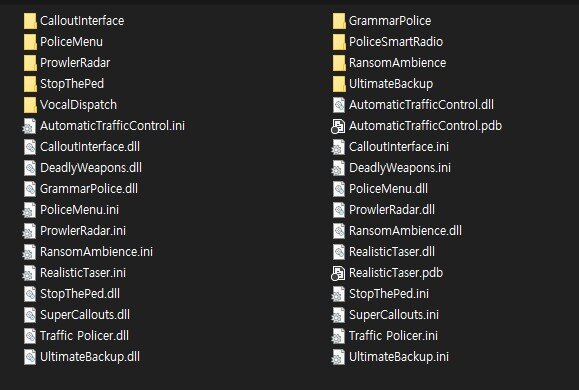
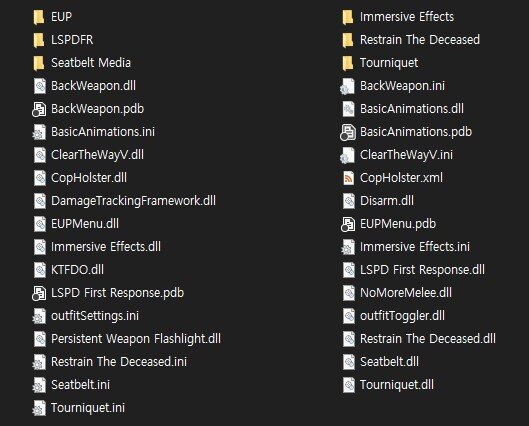
-
While the chase is in progress, the game suddenly turns off. RagePluginHook.log