


Modi12
Members
-
Joined
-
Last visited
Everything posted by Modi12
-
Thanks anyway.
-
its work without NVE
-
I've already done this, it still crushes
-
Still crashes when loading RagePluginHook_08102024_181817.log
-
Game crashed after 10 minutes of playing, RagePluginHook_08102024_175355.log
-
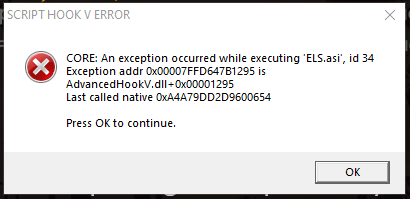
ELS crashes when loading I used the regular version and the UI too, I also have the ScriptHookVDotNet nightly build installed
-
I do not know what kind of error it is, when I log into the game and after spending 3-5 minutes in it, my game crashes. If you delete the scripthook, then this problem disappears
-
Script Hook V crashes my game after 3 minutes of playing
-
Yes, I installed this patch and added vegetation improvement (also nve)
-
Without mods folder everything works, are there any versions of the game with nve enabled?
-
https://dropmefiles.com/BbbdB I couldn't attach the file here RagePluginHook_25102023_174949.log
-
there are no rhp for these crashes
-
When I was playing, I crashed again, only an hour or two after the start of the game. Any advice on this?
-
Work, thx))))😀
-
When I go on duty, plugins start loading after that lsdpfr crashes https://youtu.be/hVVjFANa98U RagePluginHook_25102023_132538.log I didn't install any other mods, just these: Stop The Ped Ultimate Backup ELS EUP Menu Emergency uniforms pack - Law & Order Emergency uniforms pack - Serve & Rescue The last two were installed via opev iv
