LongQu
Members
-
Joined
-
Last visited
Everything posted by LongQu
-
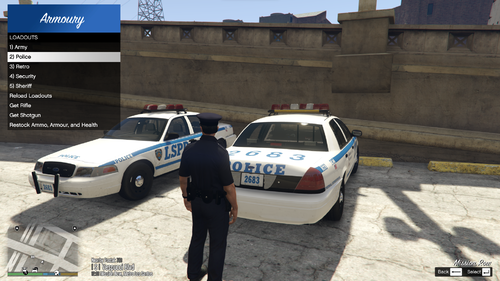 Hey bud, The updates been great and plugin has been working no issues. I found that the opening & closing animation can be quite long and was wondering if you could update the trunk animations, I use Trunk Control in conjunction with this mod and I found the trunk control animations to be quicker, mostly cause it breaks up the opening & closing animations into 2 seperate Not sure if its simple enough here, but would be great if you could 1. Press the restock or grab weapon key 2. Trunk opens, animation plays to grab equip, then trunk just remains open. 3. Press the keys again to play a quick animation and close the trunk, and have it just stand there rather than play the walk away from the trunk animation. Not sure if you get my drift. Again great plugin and love the customization options with it.
- 50 comments
- 5 reviews
-
-

- 1
-
-
- rph
- lspdfr plugin
- legacy
- rph
-
Tagged with:
-
Hey bud, Been using the plugin and its great, effortless to setup diff loadouts and swap out on the fly. A few questions/suggestions: Would it be possible to add bindable hotkeys for the "Rifle", "Shotgun", "Restock/Armour/Health"? and is it possible to have the Fire extinguisher to be saved in the vehicle, so that its not always in inventory? Probably some other things, but cant think of them atm
- 50 comments
- 5 reviews
-
-
- 1
-
-
- rph
- lspdfr plugin
- legacy
- rph
-
Tagged with:
-
-
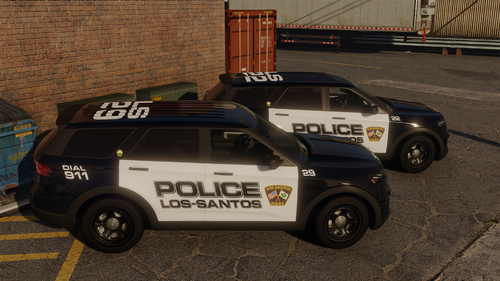 Love the liveries, clean and crisp! Would love to see more lore vehicles added, especially in the all black/white doors
- 10 comments
- 1 review
-
-
- 1
-
-
Excellent plugin, simple and effective!
- 50 comments
- 5 reviews
-
-

-
- 2
-
-
- rph
- lspdfr plugin
- legacy
- rph
-
Tagged with:
-
Hey man, This plugin is working so effortlessly, been looking for something like this for ages, works with ADDON weapons, can add/modify loadouts whilst ingame without any issues
- 50 comments
- 5 reviews
-
-
- 2
-
-
- rph
- lspdfr plugin
- legacy
- rph
-
Tagged with: