Skip to content
View in the app

A better way to browse. Learn more.

LCPDFR.com

A full-screen app on your home screen with push notifications, badges and more.

To install this app on iOS and iPadOS
  1. Tap the Share icon in Safari
  2. Scroll the menu and tap Add to Home Screen.
  3. Tap Add in the top-right corner.
To install this app on Android
  1. Tap the 3-dot menu (⋮) in the top-right corner of the browser.
  2. Tap Add to Home screen or Install app.
  3. Confirm by tapping Install.

Chikowhite305

Members
  • Joined

  • Last visited

Files posted by Chikowhite305

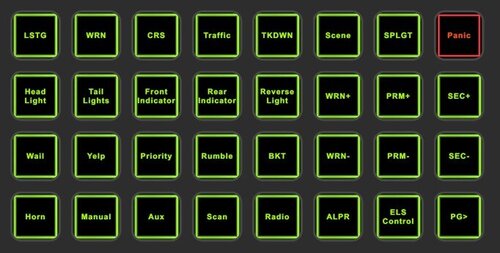
  1. Stream deck profile for ELS.

    This was designed on a 32 button stream deck and results may vary.
     
    To Install, import (ELS CONTROL) profile into stream deck by going to Settings, Profile tab,
    Drop down menu at the bottom, and Import.
     
    Included are the PNG files For additional buttons. And READ ME
     
    As all of these mods have been keybinded using the INI files and stream decks software,
    necessary Mods for this to work as programmed are:
     
    Emergency Lighting System (ELS)
    Bejoijo's ALPR Lite
    Spotlight
    Grammar police
    Delete vehicle script
     
    You will need to ensure the key bindings on the stream deck buttons, match the config files
    in your gta5 main directory. You can change these to your preferred Keys utilizing the stream deck
    software and config files/ini. Presets in READ ME
    • 666 Downloads
    Updated

Account

Navigation

Search

Search

Configure browser push notifications

Chrome (Android)
  1. Tap the lock icon next to the address bar.
  2. Tap Permissions → Notifications.
  3. Adjust your preference.
Chrome (Desktop)
  1. Click the padlock icon in the address bar.
  2. Select Site settings.
  3. Find Notifications and adjust your preference.