


Hostile Jalapeno
Members
-
Joined
-
Last visited
Everything posted by Hostile Jalapeno
-
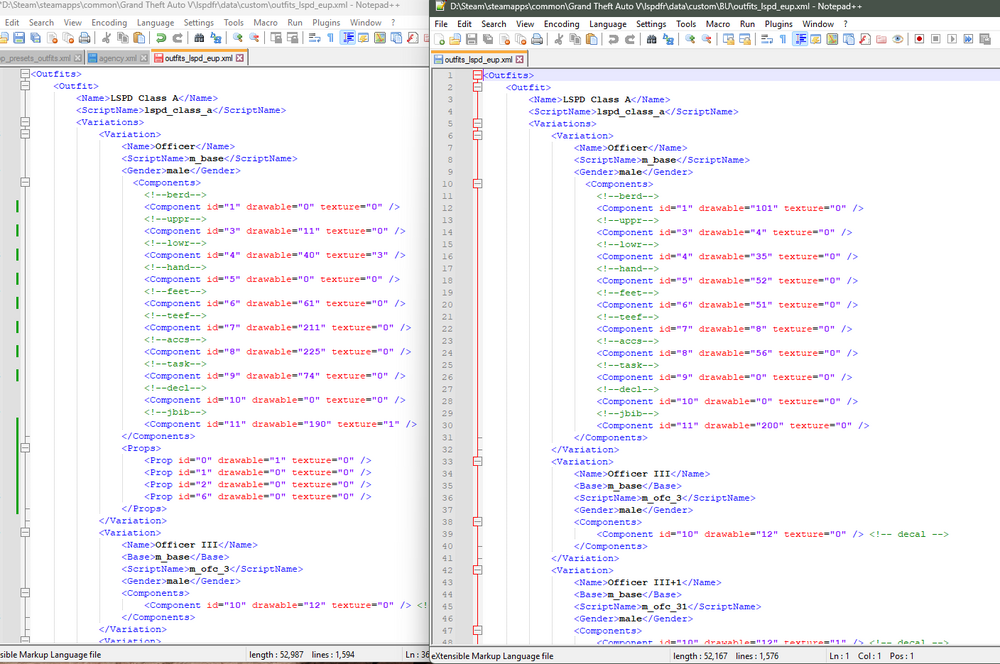
I just found out how to do this. you need EUP menu,as well as a converter like Sebo's. Take your outfit you want the ped to wear and save it in your eup menu outfits, then go to your gtav>plugins>EUP>wardrobe to find this outfite configuration . Inside GTAV>lspdfr>data>custom is where you will see a bunch of files similar to "outfits_lspd_eup" inside these are the lines you need to edit to change the police uniforms standing outside stations. Using the LSPD for example i went in and changed every section that was marked with "lspd_class_a" or "lspd_class_b" and so on. Its a lot of work and Im still doing my files. i had some issues with the props showing up but i think its an issue with the MPClothes addon. The image below shows my modified "outfits_lspd_eup" to get an idea how it looks. Hopefully this helps you or maybe others since this post is so old lol.
-
I've been trying for hours to get textures of LAPD uniforms from LAPD Overhaul 2.0 to show up in EUP. They are showing in OpenIV and I've tried 2 different packs with no luck. Only vanilla textures will show up in-game even though I've been able to add and replace some EUP items like Vests. I know I've installed everything I need and correctly, I'm just curious if the textures are elsewhere besides inside the EUP folder so GTA is using those instead, before my new ones?

