



Officer Lucy Chen
Members
-
Joined
-
Last visited
Everything posted by Officer Lucy Chen
-
-
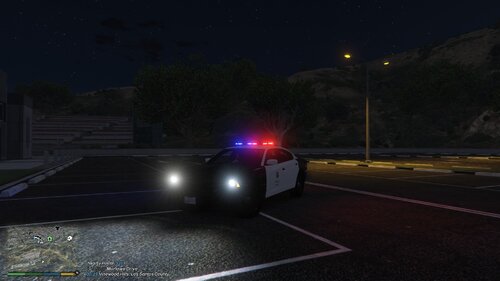 Hey guys, how are you? I hope you're doing well. This time, I'm bringing you the texture of the Dodge Charger from The Rookie. This car was first seen in Season 1, Episode 6. It appears so rarely that making a skin with so little detail is difficult, but I tried to get as close as possible. I hope you like it. IMPORTANT: The vehicle is not mine. You can download it here: HAVE FUN AND BE SAFE OFFICERS!!
 -
 Thanks for the advertence, i will change it soon as possible I
 -
oh, srry i gonna change it, thanks
-
what do u mean?
-
Thanks so much for u help, i give u some credits in my model 😉
-
-
Charger is in progress 😁
-
hahahah have fun officer, but try dont crash it again... 😂 Ye, idk why happend that, i will try fix it...
-
so... idk man, is not a mod bug, try install that with any visual mod
-
The fpiu
-
So... Idk man, try reinstall, this dont happend to other people...
-
Hahaha welcome to the rookie boot, i been Saw the show since 2019, have fun with ur explorer 😁
-
Is fixed now!! Ejoy It! Mmm Bro u have any visual mod or something? Because this Bug dont happend to me and any people.
-
Hi, thanks for ur comment, can u send me a photo of the wheel bug?
-
 Hey bro, u still have the car pack with cvpi and fpiu? If u have, can u send me? Thanks.
 -
Thank you 🙏
-
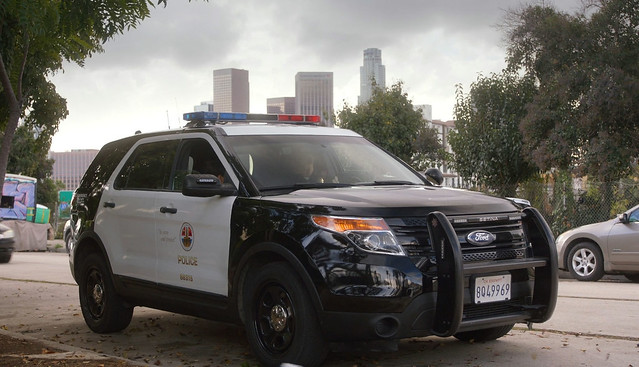
This is my first mod published on lspdfr. In this case, I'm featuring the Ford Explorer from The Rookie series. Enjoy! Remember that this mod is a WIP and may be modified in the future. DO NOT DISTRIBUTE THIS MOD ON ANY WEBSITE AND DO NOT MODIFY ANYTHING WITHOUT PERMISSION. Thanks for downloading, Enjoy it!
-
.thumb.png.75c93a6122f392c5578eb7f30e724543.png) Awesome pack! Can u add a setina pushbar to de FPIU? Like this:
Awesome pack! Can u add a setina pushbar to de FPIU? Like this:




.thumb.png.75c93a6122f392c5578eb7f30e724543.png)