Skip to content
View in the app

A better way to browse. Learn more.

LCPDFR.com

A full-screen app on your home screen with push notifications, badges and more.

To install this app on iOS and iPadOS
  1. Tap the Share icon in Safari
  2. Scroll the menu and tap Add to Home Screen.
  3. Tap Add in the top-right corner.
To install this app on Android
  1. Tap the 3-dot menu (⋮) in the top-right corner of the browser.
  2. Tap Add to Home screen or Install app.
  3. Confirm by tapping Install.

Kevin110

Members
  • Joined

  • Last visited

Everything posted by Kevin110

  1. Moin, bei mir haben ampeln und bäume so eine komsiche Textur. Ich hab auch keine ahnung wie ich das änder so das sei wieder normal wird. Vielleicht hat ja jemand eine idee. Wäre sehr nett,
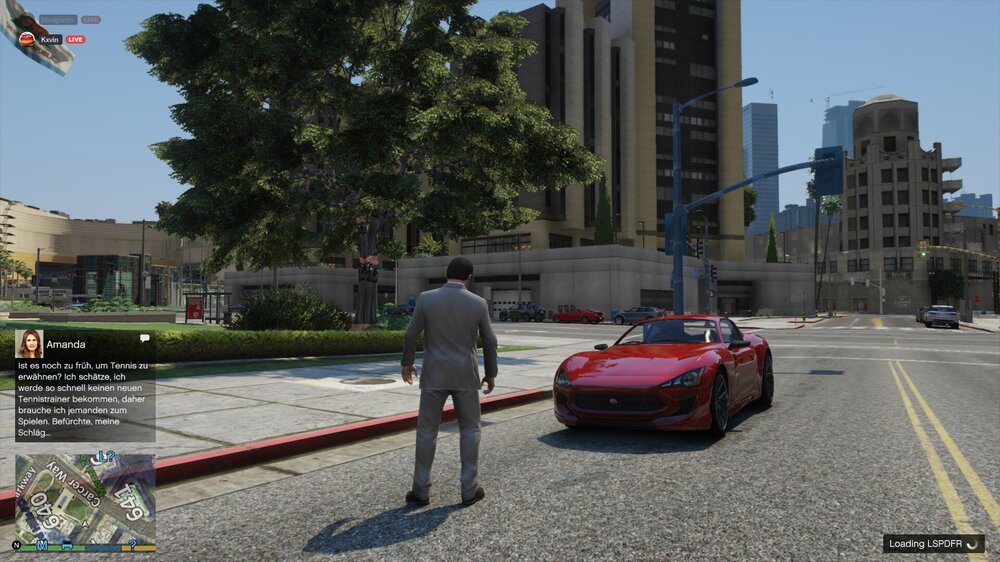
  2. Und wie sieht es aus da sind meine logs. was kann ich jetzt machen???
  3. Wenn ich LSPDFR starte funktioniert alles und der loading sreen kommt auch also mit diesen typen und bildern und alle Plugins laden und dann wenn man rein laden würde also wenn dieser blacksreen kommt kommt dann dieser ton und die nachricht das LSPDFR gecrasht ist. Brauche dringend hilfe

Account

Navigation

Search

Search

Configure browser push notifications

Chrome (Android)
  1. Tap the lock icon next to the address bar.
  2. Tap Permissions → Notifications.
  3. Adjust your preference.
Chrome (Desktop)
  1. Click the padlock icon in the address bar.
  2. Select Site settings.
  3. Find Notifications and adjust your preference.