


Sparkedpants
Members
-
Joined
-
Last visited
Everything posted by Sparkedpants
-
 If you have any questions or need any help please reach out, I'll be glad to assist!
 -
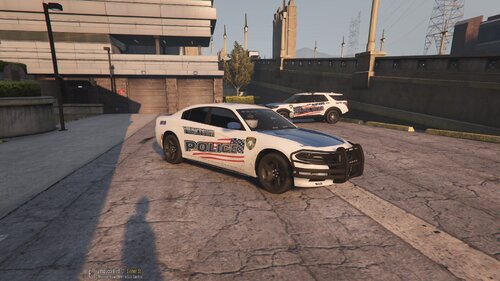
Hello everyone, this is my first time creating skins for LSPDFR and I hope you all enjoy. My texture creation resembles Yorktown Police in New York, almost 100%. They have very simple cars and are very pretty. There are two skins in the file for a charger and a explorer. Both vehicles were NOT created by me, all credit goes to the original owners of the vehicles. I have linked the files for the vehicles below which you will need to download and use for my skin to be applied. The installation of the texture files is very easy and for those who don't know I will explain below. I plan on making more skins and if you have any skins you would like, I can try and make them for you just leave a comment and we can talk VIA discord. If you have any questions or need any help with anything LSPDFR for all the newbies, leave a comment and I'll be glad to help. Thank you for checking out my creation. Have fun roleplaying!! -Sparkedpants Installation Steps - Once you have downloaded the two car packs make sure use the charger from the POLICE2 FILE "2018 SAHP Dodge Charger Pack" and POLICE3 from the Los Santos Police Department Upgrade Pack. - Install both cars into your OpenIV - Using OpenIV, open the .ytd file of each police car. - Then search for "sign" in both. - Add the charg_sign_1.png to POLICE2 (which is the charger) and "21inter_sign_1.png" to POLICE3 (which is the explorer) - Click save and it should load for a few seconds and then you are ready to play with my textures. Have fun!

