SaintCraig
Members
-
Joined
-
Last visited
Everything posted by SaintCraig
-
It doesnt do anything but it is quite annoying, i tried verifying the games files but it did nothing.
-
Is the SHVDN3 file inside the scripts file? And try using this nightly version of scripthookV, people has reported success with it (including me) https://github.com/scripthookvdotnet/scripthookvdotnet-nightly/releases
-
Download these mods and make sure the LemonUiRPH is in the main GTA V file and LemonUISHVDN3 is in the Scripts file (if you dont have it you can create it inside the GTAV directory). You can replace your normal scripthookv files with the nightly release https://github.com/scripthookvdotnet/scripthookvdotnet-nightly/releases https://github.com/LemonUIbyLemon/LemonUI/releases
-
fixed it by downloading nightly version of Scripthookvdotnet
-
All of simplehud's requirement are met, game works fine when i uninstalled the simplehud OIV installer, there were no problems before simplehud was installed. RagePluginHook.log
-
if im not wrong then its patchday22ng
-
Everything was loading normally until i downloaded the BlueGhost's unmarked vehicles (OIV installation) RagePluginHook.log
-
RagePluginHook.log (SIDE NOTE: I already removed the DLCLIST of the said mod, it is not there anymore but it still crashes)
-
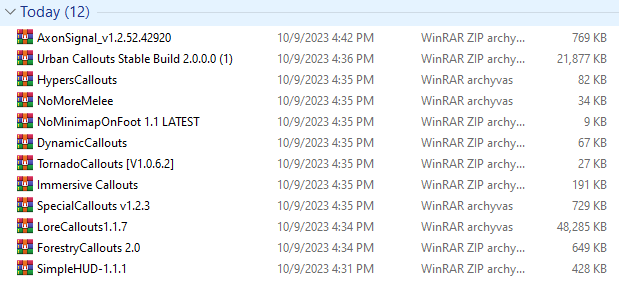
Check the image for the mods i've downloaded today, when i start up the game, it loads then randomly crashes. RagePluginHook.log
-
It fixed itself
-
It works fine without RAGE, it's just RAGE randomly shuts itself down when i open it.
-
Hello, when i try staring up RPH, it shows up for a little bit, it says validating. But after a few seconds validating it just shuts down with no logs or no mistakes, Yes, I did download the new updates. I tried reinstalling for the 3rd time but the problem persists. I've tried turning off anti virus, still happens. Any theories?
-
This mod helped me fix the texture loss problems, see if it works for you 😁 https://www.lcpdfr.com/downloads/gta5mods/misc/42250-resource-adjuster/
-
LSPDFR crashes on forceduty the 1st file is when i removed the suspected mod but it still crashes the 2nd is when i didn't delete anything. i have to go soon so i hope you guys find the solution before i return. RagePluginHook_02102023_092746.log RagePluginHook_02102023_091718.log
-
Hey, i managed to fix it myself, There was something wrong with the vehiclemeta.xml, so i downloaded a vanilla one and pasted it over mine.
-
I've tried verifying game files, it didn't work. (most likely a faulty vehicle installation) Heres my RPH crash report: