


TheGoldenRetriever19
Members
-
Joined
-
Last visited
Everything posted by TheGoldenRetriever19
-
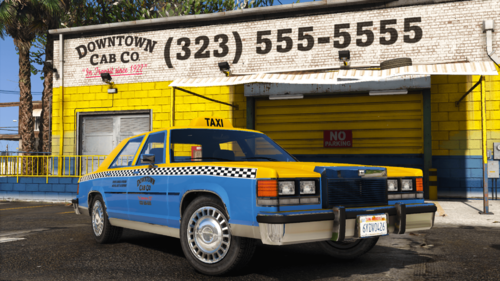 (Obtained permission from Dani02 to use the admiral classic mod and upload) This is my first proper 3d lore friendly mod, I hope you enjoy it. https://www.gta5-mods.com/vehicles/dundreary-admiral-classic-add-on DESCRIPTION "The Admiral Classic has its place in the public psyche as the "luxury" car for bonus begging blue collar workers, sleazy cabbies, and insulin pumped cops. With its production funded by your tax dollars 40 years ago, you can experience it today with the smell of alcohol and domestic abuse deeply embedded into the seats by the last chump of an owner." ASK AUTHOR'S PERMISSION BEFORE USING ON ANY MULTIPLAYER MODIFICATION PLATFORM! First Read Below, for more information and to request permission contact me on Discord (linked to my account here). DISCLAIMER Do not modify or re-upload this modification without authors' permissions. Do not exploit the contents of this modification for commercial, financial or personal gain. This modification is intended for Singleplayer and private (dev server) FiveM use, but to alter/edit in any way or add these assets to a public or private community (server) on FiveM, AltV and RageMP (or any other mulitplayer modification) you must first ask the authors' permission by including the name of the server that will use them and also must include full credits to the authors for the use of this asset. We do not do singleplayer, FiveM or RageMP technical support and do not ask for an ELS or DLS version. INSTALLATION You will need OpenIV to install these files onto your GTA 5 game and FiveM server. Please refer to the INSTALLATION GUIDE section below for the download/installation information for SinglePlayer. FEATURES - Trim removed/edited to give the vehicle a more stock or base trim feeling. - All LODs livery mapped - External assets have LODs and dirtmapping (taxi sign, lightbar, miscs) - Appropriate details added (wheels, taxi sign, lightbar, spotlights, sirencontroller) - Police version with custom handling fitting cars of the era. INSTALLATION GUIDE Copy the admiral4 folder to:update/x64/dlcpacks In the update.rpf go to:/common/data, edit the dlclist.xml and add this line: dlcpacks:/admiral4/ This should go under the other dlcpack names. CHANGELOG 1.0 - x3 versions of the admiral classic VEHICLE MODEL NAMES admiral3old - stock utility vehicle admiral3taxi - Taxi vehicle admiral3pol - Police Demo vehicle BUGS Please note I am aware of the carcols light bug and am attempting to rectify it, however, other than that the vehicles should be working perfectly fine. CREDITS - GCT - Original vehicle model - Dani02 - Conversion to GTA V, giving permission to use his V conversion - TheGoldenRetriever19 - Vehicle Livery Mapping, trim edits/removal, wheel changes, Scratch modelled, textured and ported lightbar, taxi sign, spotlight mounts, misc liveries - 11john11 & w/ (weeby) - Spotlights, wheels - Eddlm - Custom Handling for Police version - Neogeo39 - Vinewood, Grouped, Rockford, LS co-op, Kaufamann Taxi Liveries - Pieske - Singleplayer DLC conversion - Suzuka & UkeyS - Screenshots - LoreHub Community for feedback/bug testing and support. - ClearlyAdam and Nee__ - Emotional Support and being Handsome - Engetsuka - Description I hope you enjoy this Mini-Pack!

